
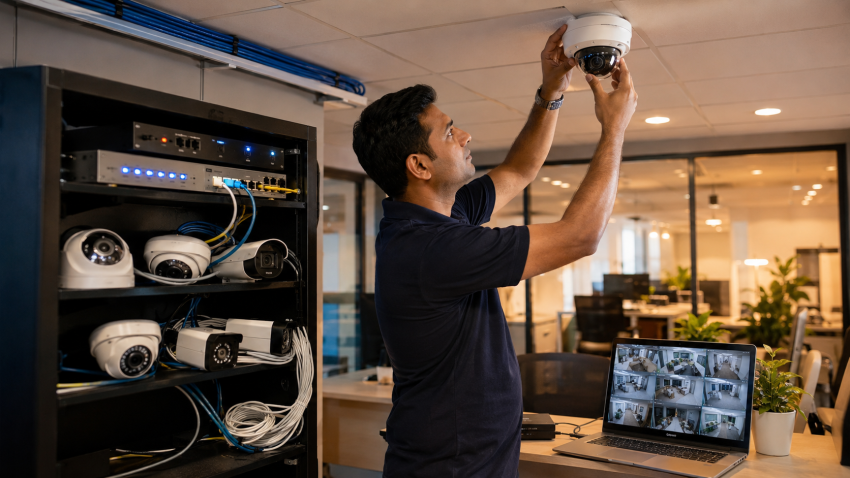
Planning to install CCTV cameras at your office, shop, or home in Delhi? Before you spend a single rupee, there is a lot to understand — DVR vs NVR, analogue vs IP, Hikvision vs CP Plus, how much HDD you actually need, whether Wi-Fi cameras are worth it, and what a fair CCTV camera full set price looks like in 2025–26.
This guide covers everything. Written by the team at Classic Network and Computers (CNC), which has been installing CCTV surveillance cameras across Delhi NCR for offices, schools, hospitals, warehouses, and retail stores.
Why Every Delhi Business Needs CCTV in 2025
Delhi NCR sees over 4 lakh property-related crimes reported annually. But for most businesses, CCTV isn’t just about crime prevention — it’s about operational visibility, employee accountability, and insurance protection.
Modern CCTV surveillance camera systems do far more than record footage. They can:
- Send motion alerts to your phone at 3 AM when someone enters your premises
- Let you monitor your shop from Gurgaon while you’re in a meeting in Connaught Place
- Provide timestamped evidence that protects you in customer disputes
- Reduce your commercial property insurance premium by 10–25%
- Monitor delivery staff, guard attendance, and visitor logs
The cost of not having a working CCTV system — one real incident, one theft, one false claim — almost always exceeds the cost of a proper installation. The only question is which system is right for your situation.
Types of CCTV Cameras — Which One Do You Need?
Dome vs Bullet Cameras
This is the first visual decision most people make — and it matters less than they think. What matters is the sensor quality and the lens. But here is the practical difference:
| Feature | Dome Camera | Bullet Camera |
|---|---|---|
| Mounting | Ceiling or wall (ceiling preferred) | Wall or pole |
| Visibility to intruder | Less obvious — direction hard to tell | Highly visible — acts as deterrent |
| Coverage area | Wide angle, good for indoor | Longer range, good for corridors and parking |
| Tamper resistance | Harder to vandalize or redirect | Easier to physically deflect |
| Best for | Office reception, retail floor, classroom | Gate entry, parking lot, warehouse perimeter |
Recommendation for most Delhi offices: Dome cameras indoors, bullet cameras at entry gates and outdoor perimeter. Many installations use a mix.
IP Camera vs Analogue Camera — The Resolution Revolution
This is the single most important technical decision in any CCTV camera installation.
Analogue cameras (also called AHD, HDCVI, or HDTVI cameras) work with a DVR (Digital Video Recorder). They transmit video over coaxial cable. Modern HD analogue cameras deliver up to 8MP (4K) resolution and are significantly cheaper than IP systems.
IP cameras (Internet Protocol cameras) work with an NVR (Network Video Recorder). They transmit compressed digital video over CAT6 network cable or Wi-Fi. IP cameras offer higher image quality at equivalent resolutions, built-in analytics like face detection, better scalability, and easier long-distance runs using PoE switches.
| Factor | Analogue (HD/DVR) | IP Camera (NVR) |
|---|---|---|
| Cabling | Coaxial cable (RG59) | CAT6 network cable |
| Resolution | Up to 8MP / 4K | Up to 12MP and beyond |
| Cost (per camera) | Lower — ₹1,500–₹6,000 | Higher — ₹3,000–₹15,000+ |
| Installation | Simpler, familiar to most technicians | Requires network knowledge |
| Scalability | Limited by DVR channel count | Highly scalable via network switches |
| Analytics | Basic motion detection | Face detection, people counting, line crossing |
| Best for | Small offices (4–16 cameras), budget-conscious | Large premises, multi-floor, future-proofing |
Practical advice: For a 4–16 camera system in a typical Delhi SME office, a quality HD analogue system with a Hikvision or CP Plus DVR delivers excellent results at significantly lower cost. For larger deployments (24+ cameras, multi-building, or where analytics matter), go IP with NVR.
Wi-Fi Cameras — When They Work and When They Don’t
Wi-Fi CCTV cameras are popular because they seem to eliminate cabling headaches. In practice, they work well in limited, specific scenarios and fail in others.
Where Wi-Fi cameras work:
- Small home installations (2–4 cameras, strong Wi-Fi throughout)
- Temporary monitoring needs
- Locations where cable routing is genuinely impossible
- Cloud-recording setups where local storage isn’t critical
Where Wi-Fi cameras fail:
- Large offices where Wi-Fi coverage is uneven
- Outdoor or industrial locations with interference
- Anywhere you need more than 6–8 cameras (network congestion becomes a serious problem)
- Environments with thick concrete walls blocking signal
- Situations requiring high-definition continuous recording — wireless bandwidth is simply insufficient
Most professional installers in Delhi recommend wired systems for any commercial installation. Wi-Fi cameras are a convenience trade-off, not an upgrade.
PTZ Cameras — Pan, Tilt, Zoom Explained
PTZ (Pan-Tilt-Zoom) cameras can rotate, tilt, and optically zoom under remote control or automatically. A single PTZ camera can cover an area that would otherwise require 3–5 fixed cameras.
They are expensive (₹15,000–₹80,000 per unit) and typically used in large outdoor spaces: parking lots, factory floors, event venues, and campus-style premises. For most Delhi SME offices and retail stores, fixed cameras with wide-angle lenses are more cost-effective.
DVR vs NVR — The Most Important Choice You’ll Make
The recorder is the brain of your CCTV system. Getting this choice right is more important than the camera brand.
A DVR (Digital Video Recorder) works with analogue cameras. It receives video over coaxial cable, compresses it, and stores it on a CCTV HDD. DVRs are robust, relatively inexpensive, and widely understood by technicians across Delhi.
An NVR (Network Video Recorder) works with IP cameras. It receives pre-compressed video over a network connection. NVRs are more powerful, support higher resolutions and AI analytics, and offer greater flexibility — but cost more and require network expertise to configure properly.
| Feature | DVR | NVR |
|---|---|---|
| Compatible cameras | Analogue (HD-TVI, AHD, HDCVI) | IP cameras only |
| Cabling | Coaxial + separate power cable | Single CAT6 (with PoE switch) |
| Typical price (8-channel) | ₹4,000–₹12,000 | ₹8,000–₹25,000 |
| HDD support | 1–4 HDDs typically | 1–8 HDDs in enterprise models |
| Max resolution | 4K on modern units | 12MP+ on premium models |
| Remote access | Yes, via manufacturer app (Hik-Connect, DMSS) | Yes, via manufacturer app |
| Best for | 4–32 camera systems, SMEs, cost-effective setups | Large enterprises, multi-site, future expansion |
Channels matter: Buy a recorder with more channels than you currently need. A 4-camera office today often becomes 8-camera in two years as the business grows. Buying a 16-channel DVR when you need 6 cameras costs very little extra and saves a full system replacement later.
Hikvision vs CP Plus vs Dahua — Which Brand Is Right for Delhi?
These three brands dominate the Delhi NCR CCTV market for good reason. Here is an honest comparison based on what CNC’s installation team sees daily across client sites.
Hikvision
Hikvision is the world’s largest CCTV manufacturer by volume. Their products set the benchmark for image quality, firmware stability, and feature depth. Hikvision’s Hik-Connect app for remote viewing is the most stable and full-featured in the market.
- Best for: Corporate offices, multi-site installations, enterprise NVR setups
- Price range: Mid to premium — slightly higher than CP Plus at equivalent specs
- Support in Delhi: Excellent — widespread distributor network, easy spare parts
- Standout products: Hikvision ColorVu cameras (full-colour night vision), AcuSense AI detection, 4K DS-series DVRs
CP Plus
CP Plus (CPPLUS) is India’s homegrown CCTV brand and the market leader by volume in the SME segment. They offer aggressive pricing, localised Hindi-language support, and wide availability even in Tier 2 cities.
- Best for: Small offices, retail stores, residential complexes, budget-conscious deployments
- Price range: Most affordable at entry level — 10–20% cheaper than Hikvision at equivalent spec
- Support in Delhi: Very strong — service centres across Delhi, strong distributor network
- Standout products: CP-USC series HD cameras, CP-UNR NVR line, CP-VNP bullet cameras
Dahua
Dahua is the second-largest global CCTV manufacturer and Hikvision’s closest technical peer. They are less prevalent in the Delhi retail market but increasingly popular for large enterprise and government tenders.
- Best for: Large institutional deployments, government projects, clients needing Dahua-specific integrations
- Price range: Similar to Hikvision
- Support in Delhi: Good but less widespread than Hikvision or CP Plus
CNC’s honest recommendation: For 4–24 camera office and retail installations in Delhi NCR, CP Plus delivers the best value. For enterprise deployments where image quality, analytics, and long-term firmware support are critical, Hikvision is the right choice. Avoid mixing brands within a single system — cameras, DVR/NVR, and accessories should all come from the same ecosystem for compatibility and remote access to work reliably.
PoE Network Switch — What It Is and Why It Matters for IP CCTV
If you’re installing an IP camera system, you will hear about PoE switches (Power over Ethernet). Understanding this saves you from being confused or oversold.
A PoE (Power over Ethernet) switch delivers both data and electrical power through a single CAT6 cable to each IP camera. This eliminates the need for a separate power supply at every camera location — a major installation simplification.
Without PoE, each IP camera would need its own power adapter plugged in at the camera end. For ceiling-mounted cameras in a finished office, running a separate power cable is often impractical and expensive.
Types of PoE Switches for CCTV
| Type | Power per port | Best for | Approx price (8-port) |
|---|---|---|---|
| PoE (IEEE 802.3af) | Up to 15.4W | Standard HD IP cameras | ₹2,500–₹5,000 |
| PoE+ (IEEE 802.3at) | Up to 30W | Pan-Tilt-Zoom cameras, heater-equipped cameras | ₹4,000–₹9,000 |
| PoE++ (IEEE 802.3bt) | Up to 60–90W | High-power PTZ, access control panels | ₹8,000+ |
Critical point: The total power budget of the switch matters more than the per-port spec. An 8-port, 120W PoE switch can power 8 cameras only if they each draw under 15W. If your cameras draw 20W each and you have 8 of them, you need a 160W switch. CNC’s engineers calculate this during site surveys — it’s a common cause of intermittent camera dropouts when the switch runs out of power budget.
For analogue DVR-based systems, PoE switches are not required. Analogue cameras use coaxial cable with a separate power supply or a combined power-and-video balun adapter.
CCTV HDD — How Much Storage Do You Actually Need?
The CCTV HDD (Hard Disk Drive) inside your DVR or NVR stores your recorded footage. Buying the wrong size is one of the most common mistakes in CCTV installations.
CCTV HDDs are different from regular computer HDDs. They are designed for 24/7 continuous write operations — something regular desktop HDDs are not built for. Using a desktop HDD in a DVR typically leads to failure within 6–18 months. Always insist on surveillance-grade HDDs: Seagate SkyHawk, Western Digital Purple, or equivalent.
Storage Calculator — How Many Days of Footage?
Your storage requirement depends on: number of cameras, resolution, frames per second, compression format, and whether you record continuously or only on motion.
| Setup | Recording mode | 2TB HDD gives | 4TB HDD gives |
|---|---|---|---|
| 4 cameras @ 1080p, H.265 | Continuous 24/7 | ~15 days | ~30 days |
| 8 cameras @ 1080p, H.265 | Continuous 24/7 | ~7 days | ~15 days |
| 8 cameras @ 1080p, H.265 | Motion-triggered only | ~20 days | ~40 days |
| 16 cameras @ 1080p, H.265 | Continuous 24/7 | ~4 days | ~8 days |
| 4 cameras @ 4K, H.265 | Continuous 24/7 | ~7 days | ~15 days |
H.265 vs H.264 compression: Always choose H.265 (HEVC) if your DVR/NVR supports it. H.265 delivers the same video quality at roughly half the file size — meaning double the storage duration for the same HDD. All modern Hikvision and CP Plus units support H.265.
Minimum recommendation: Most Indian legal and insurance requirements need 30 days of footage for commercial premises. For an 8-camera 1080p system recording continuously, a single 4TB surveillance HDD gives about 15 days. Use a 6TB or 8TB drive, or add a second HDD bay, to reach 30 days comfortably.
How Many Cameras Does Your Office or Shop Need?
There is no universal answer, but there are clear principles:
- Entry and exit points: Every door that leads outside the building needs at least one camera — ideally two (one facing the door, one facing the approach).
- Cash handling areas: Counter, billing desk, or safe room — needs a dedicated camera with face-level framing.
- Server rooms and equipment areas: One dedicated camera inside the room.
- Parking and perimeter: Bullet cameras covering every vehicle approach lane, with enough overlap that there are no blind spots.
- Open office floors: Wide-angle dome cameras — typically one per 150–200 sq ft of floor area.
Typical camera counts by business type in Delhi NCR:
| Business type | Typical count | Recommended system |
|---|---|---|
| Small retail shop (200–400 sq ft) | 2–4 cameras | 4-channel CP Plus DVR + 1TB HDD |
| SME office (10–30 staff) | 6–12 cameras | 16-channel Hikvision DVR + 4TB HDD |
| Restaurant / café | 4–8 cameras | 8-channel DVR + 2TB HDD |
| School / educational institute | 12–40 cameras | 32-channel NVR + IP cameras |
| Warehouse / factory | 16–60 cameras | Multi-NVR setup + PoE switches |
| Residential flat (3 BHK) | 2–4 cameras | 4-channel DVR or Wi-Fi NVR + 1TB HDD |
CCTV Camera Full Set Price in Delhi — Realistic Costs for 2025–26
Below are honest, current price ranges for complete CCTV systems installed in Delhi NCR by CNC. These are complete installed prices — including cameras, DVR/NVR, HDD, cabling, power supplies, connectors, and labour. Not just the equipment cost.
| Package | Specs | Installed Price Range |
|---|---|---|
| Starter — 4 Camera HD | 4× CP Plus 2MP dome, 4-ch DVR, 1TB HDD, cabling up to 100m | ₹15,000–₹22,000 |
| Office Essentials — 8 Camera | 8× Hikvision 2MP, 8-ch DVR, 2TB HDD, cabling up to 200m | ₹28,000–₹40,000 |
| Office Pro — 8 Camera 4K | 8× Hikvision 4K, 8-ch 4K DVR, 4TB HDD, cabling up to 200m | ₹45,000–₹65,000 |
| 16 Camera HD System | 16× CP Plus 2MP, 16-ch DVR, 4TB HDD, cabling | ₹50,000–₹75,000 |
| IP / NVR System — 8 Camera | 8× Hikvision 4MP IP, PoE NVR, PoE switch, 4TB, CAT6 cabling | ₹55,000–₹85,000 |
| Enterprise — 32 Camera | 32× Hikvision 2MP, 32-ch NVR, 6TB×2 HDD, full cabling | ₹1,40,000–₹2,20,000 |
What affects the price most:
- Cabling length and complexity. In a multi-floor building with false ceilings, cable laying is 30–40% of the total project cost.
- Camera resolution. Going from 2MP to 5MP approximately doubles the camera cost.
- HDD size. Jumping from 1TB to 4TB adds ₹4,000–₹6,000.
- Number of channels vs cameras. Always buy the next DVR size up — the marginal cost is ₹1,500–₹3,000 and saves you a full upgrade later.
Warning signs of a quote that’s too cheap: If someone quotes ₹8,000 for a 4-camera installed system, they are cutting corners on the HDD (using a desktop drive that will fail), the cabling (thin wire that degrades signal), or the DVR (no-name clone firmware). CNC sees these systems for repair constantly — the saving is almost always false economy.
📷 Get a Free CCTV Site Survey in Delhi
CNC’s engineers visit your premises, assess camera positions, cable routes, and coverage requirements, then give you a detailed written quote — no obligation. Available across Delhi NCR.
View CCTV Installation Services →
💬 WhatsApp for Free Survey
📞 +91-9810130131
Setting Up Remote Viewing on Your Phone
One of the most asked questions at CNC’s service desk: “I can’t see my cameras on my mobile — what’s wrong?”
Remote viewing requires: an internet connection at your DVR/NVR location (Wi-Fi router or wired broadband), a mobile app, and correct configuration of the device’s network settings. Most modern DVRs and NVRs support this through manufacturer apps:
- Hikvision: Hik-Connect or iVMS-4500 (iOS and Android)
- CP Plus: gCMOB (Android and iOS)
- Dahua: DMSS (Android and iOS)
Setup involves scanning a QR code from the DVR, creating an account on the manufacturer’s cloud platform, and adding the device. Live view, playback, and motion alerts all work through the app.
Common reasons remote viewing fails:
- DVR not connected to the router (separate LAN cable required)
- Router firewall blocking the DVR’s port
- Weak internet connection at the premises (minimum 2 Mbps upload required for 4-camera remote view)
- App not matching the DVR firmware version
CNC configures remote viewing as a standard part of every installation — and confirms it works on the client’s own phone before closing the job.
What Happens During a Professional CCTV Installation?
Understanding the process helps you evaluate quotes and ensure nothing is cut short.
- Site survey (free at CNC). Engineer visits, photographs positions, measures cable runs, checks power availability, identifies blind spots. This is where the system is really designed.
- Layout plan and quote. Camera positions marked on a floor plan, cable route described, equipment list, final price.
- Material procurement. Cameras, DVR/NVR, HDD, cabling, conduit, power supplies, connectors, junction boxes. CNC sources only from authorised distributors.
- Cable laying. Coaxial or CAT6 cables run through walls, false ceilings, conduit pipes. The single most time-consuming part. For a 16-camera system in a 3-floor office, expect 1–2 days of cable work.
- Camera mounting. Dome or bullet cameras mounted at designed positions. Angle adjusted for optimal coverage — tested with live view before finalising.
- DVR/NVR installation and configuration. HDD formatted, channels named, motion detection zones defined, recording schedules set, H.265 enabled, date/time synced.
- Remote viewing setup. App installed on client’s phone, device added, live view confirmed from outside the building network.
- Handover and training. Client shown how to use playback, access recordings, export footage to USB. User manual provided.
A professional CCTV installation near me in Delhi should include all 8 of the above. If a quote doesn’t mention site survey, remote viewing setup, or handover training — it’s an incomplete service.
CCTV Repair Near Me — Common Faults and What Fixes Them
If you’re searching for CCTV repair near me in Delhi, here are the most common faults CNC’s technicians encounter and what is typically involved in fixing them:
| Fault symptom | Likely cause | Fix |
|---|---|---|
| No image on one or more channels | Camera power failure, connector corrosion, damaged coaxial cable | Test with replacement cable; replace power supply or connector |
| Blurry or smeared image | Dirty dome cover, lens fogged, IR reflection from dome glass | Clean dome, adjust IR cut filter, replace dome glass |
| Black screen at night | IR LEDs burned out, lens aperture stuck | Replace camera IR board or full camera |
| DVR not recording | HDD failed, HDD not formatted for surveillance, HDD full (overwrite disabled) | Replace surveillance-grade HDD, reformat, enable overwrite |
| Remote viewing not working | Router or IP configuration changed, app outdated, cloud service disruption | Reconfigure network settings, update app, re-add device |
| Flickering image | Loose BNC connector, power fluctuation | Reseat connectors, add UPS stabiliser for DVR |
| DVR boots but shows no video | HDMI/VGA cable loose, monitor input wrong, DVR firmware corrupted | Re-seat cables, update firmware, reflash DVR |
| HDD not detected | SATA cable loose, HDD failure, incompatible HDD model | Replace HDD with surveillance-grade drive |
CNC offers on-site CCTV diagnostic and repair across Delhi NCR under AMC contracts and as on-demand calls. Most single-camera faults are resolved in 2–4 hours on-site.
CCTV AMC — Why Maintenance Matters More Than the Installation
A CCTV system is a piece of technology running 24 hours a day, 7 days a year. Without regular maintenance, real-world failure rates are significant:
- CCTV HDDs typically last 3–5 years under continuous operation — without monitoring, they fail silently and you don’t notice until you need a recording that doesn’t exist
- Dome camera covers accumulate dust, bird droppings, and spider webs — reducing image clarity by 40–60% within 6 months in Delhi’s environment
- Outdoor cable connections corrode during monsoon season, causing intermittent dropouts
- DVR firmware updates address security vulnerabilities and improve stability
- Motion detection zones drift as furniture is moved, creating gaps in coverage
CNC’s CCTV Annual Maintenance Contract (AMC) includes quarterly on-site visits, lens and dome cleaning, connector inspection, firmware updates, HDD health monitoring, and remote viewing reconfiguration as needed. AMC pricing starts from ₹3,000 per year for a 4-camera system.
10 Questions to Ask Before Hiring a CCTV Installer in Delhi
- Will you do a site survey before quoting? Any professional installer should visit the premises. A quote without a site survey is a guess.
- Are you an authorised reseller of the brands you’re installing? Fake or grey-market Hikvision and CP Plus products are common in Delhi. Ask for purchase invoices from authorised distributors.
- What type of HDD will you install — desktop or surveillance-grade? If they can’t answer this, walk away.
- What is the warranty on cameras, DVR, and HDD separately? Standard: cameras 2 years, DVR 2 years, HDD 3 years from manufacturer.
- Will you set up remote viewing before you leave? Non-negotiable — test it on your phone before signing off.
- What is your cable quality and what conduit protection will you use outdoors? Exposed outdoor cables without UV-resistant conduit fail in 1–2 monsoon seasons.
- Do you offer AMC after installation? Fly-by-night operators vanish after payment. Established firms offer ongoing maintenance.
- How long have you been operating in Delhi? CCTV installation is not just about the hardware — it’s about having an engineer available when something goes wrong six months later.
- Can you show me similar installations you’ve done? Photos or site visits to comparable client setups build confidence.
- Is your quote inclusive of GST? Some quotes show pre-GST pricing — the final invoice will be 18% higher.
For a free site survey and end-to-end setup, contact CNC for professional CCTV installation in Delhi — covering Hikvision, CP Plus, IP cameras, DVR, NVR, and biometric access control.
Frequently Asked Questions — CCTV Installation Delhi
What is the difference between DVR and NVR?
A DVR (Digital Video Recorder) works with analogue HD cameras (AHD, HDTVI, HDCVI) over coaxial cable. An NVR (Network Video Recorder) works with IP cameras over network cable (CAT6). DVR systems are simpler and less expensive for small setups; NVR systems offer higher scalability, better resolution, and advanced analytics for larger deployments.
What is a good CCTV camera full set price for a small office in Delhi?
A complete 4-camera HD system for a small office in Delhi — including cameras, DVR, 1TB surveillance HDD, cabling, power supplies, and installation — costs ₹15,000–₹22,000 with a reputable installer. An 8-camera system costs ₹28,000–₹45,000. Be cautious of quotes significantly below these ranges as they typically involve substandard components.
Which is better for Delhi offices — Hikvision or CP Plus?
Both are excellent for the Delhi market. CP Plus offers the best value in small to mid-size deployments (4–16 cameras) and has strong localised support. Hikvision is preferred for enterprise setups requiring high resolution, AI analytics, or multi-site management. CNC installs both and recommends based on your specific requirements and budget.
How long do CCTV cameras record footage?
Storage duration depends on the number of cameras, resolution, recording mode (continuous or motion-triggered), and HDD size. A typical 8-camera 1080p H.265 system with a 4TB surveillance HDD records approximately 15 days of continuous footage. With motion-triggered recording, this extends to 30–40 days. CNC sizes storage based on your specific requirement during the site survey.
Can I install CCTV cameras myself?
Small plug-and-play Wi-Fi camera systems can be self-installed. However, professional wired installations involve cable routing through walls and ceilings, power supply planning, DVR configuration, and remote viewing setup — tasks that require tools, expertise, and knowledge of electrical safety. Poor installation leads to blind spots, early hardware failure, and footage that doesn’t hold up when you actually need it.
What is a PoE switch and do I need one?
A PoE (Power over Ethernet) switch powers IP cameras through the same CAT6 cable that carries video data — eliminating the need for separate power supplies at each camera. You need a PoE switch only if you are installing IP cameras with an NVR. Analogue camera systems with DVRs do not use PoE switches.
How much HDD storage do I need for my CCTV system?
Always use a surveillance-grade HDD (Seagate SkyHawk or WD Purple) — never a desktop drive. For most commercial installations requiring 30 days of footage, a 4TB HDD supports an 8-camera 1080p system recording continuously in H.265 compression. Larger systems or higher resolutions require 6TB–8TB or multiple drives.
Can I view my CCTV cameras on my mobile phone from outside Delhi?
Yes. All modern Hikvision, CP Plus, and Dahua systems support remote viewing via smartphone apps (Hik-Connect, gCMOB, DMSS) from anywhere in the world, as long as the DVR/NVR location has an active internet connection. CNC sets up and tests remote viewing on the client’s phone as part of every installation.
How do I find reliable CCTV repair near me in Delhi?
Look for a company that: is physically based in Delhi with a verifiable address, has been operating for several years, offers AMC contracts (implying they plan to be around after the job), can show similar repair work, and provides a job card with diagnosis before charging for repairs. CNC offers on-site CCTV repair and diagnosis across Delhi NCR — call +91-9810130131 or WhatsApp 8130992267.
Are wireless Wi-Fi CCTV cameras good for offices?
Wi-Fi cameras are suitable for homes and small retail spaces with strong Wi-Fi coverage. For offices, wireless systems suffer from network congestion, interference, and bandwidth limitations when more than 4–6 cameras are used simultaneously. Professional office CCTV installations use wired connections for reliability, bandwidth, and uptime.
📷 CCTV Installation in Delhi — CNC Provides Free Site Survey
CNC installs CP Plus, Hikvision, and Dahua CCTV systems across Delhi NCR for offices, retail stores, schools, hospitals, warehouses, and residential complexes. Free site assessment, detailed written quote, professional installation, and ongoing AMC support.
- ✅ Free site survey anywhere in Delhi NCR
- ✅ Authorised Hikvision and CP Plus products — no grey market
- ✅ Surveillance-grade HDD, not desktop drives
- ✅ Remote viewing set up and tested on your phone before we leave
- ✅ 2-year warranty on cameras and DVR/NVR
- ✅ Annual maintenance contracts from ₹3,000/year
CCTV Installation Services →
💬 WhatsApp for Free Quote
📞 +91-9810130131
Related Services at CNC
- 🌐 Office Network Setup Delhi
- 🛡 IT AMC Delhi — Annual Maintenance Contract
- 💾 CCTV DVR Data Recovery Delhi
- 🔧 Laptop Repair Delhi — Same Day