
Last updated: August 2026 · Classic Network and Computers (CNC), O-41 West Patel Nagar, New Delhi · Network Solutions →
Office Network Setup in Delhi — Free Site Survey & Fixed Quote
Classic Network and Computers (CNC) designs and installs office networks, firewalls, Wi-Fi, structured cabling, and CCTV for Delhi NCR businesses since 1996. Free site survey → written fixed-price quote within 48 hours.
A new office network in Delhi takes one to three days to set up correctly and lasts five to eight years if the right decisions are made upfront. Made incorrectly, it causes repeated outages, security gaps, and re-cabling costs that exceed the original installation. This checklist covers every decision point, in the right sequence, with 2026 costs for a 10–50 person Delhi NCR office.
Quick answer: Cat6 structured cabling + office-grade managed switch + UTM firewall + ceiling Wi-Fi APs + UPS on all network gear + guest VLAN separation. Skip any one of these and you will pay more to add it later. Full checklist below.
Before You Start: Three Questions That Change the Design
1. How many devices will be wired vs wireless?
Desktops, printers, servers, NVRs, and CCTV cameras should be on wired ethernet. Laptops, tablets, and phones can use Wi-Fi. The ratio determines how many ethernet ports you need and whether a managed switch is justified. Get this number before purchasing anything.
2. On-premise server or cloud-only?
On-premise servers need dedicated rack space, power conditioning, cooling, and a UPS sized for the load. Cloud-only setups simplify the local network but increase your dependence on internet uptime — which in Delhi means your ISP’s reliability matters more than your local hardware. Consider dual ISPs on separate physical lines if your work cannot tolerate internet outages.
3. What are your data sensitivity requirements?
Offices handling financial records, patient data, government contracts, or client confidential files need VLAN segmentation and access controls from the start — not retrofitted later. Design this in before cabling begins; adding it after is expensive and disruptive.
Phase 1: Infrastructure Planning
- Measure the floor plan and mark the server room or IT closet. All structured cabling terminates here. In a rented Delhi office, confirm with the landlord that you can run cables through walls or false ceilings before starting.
- Count ethernet drops per room. One port per desk is the minimum. Add 20% buffer. Conference rooms need at least 2 wired ports plus ceiling Wi-Fi coverage planned separately.
- Choose Cat6 cable. Cat6 supports 1 Gbps to 100 metres and future-proofs the cabling for 5–7 years. Cat5e is cheaper but not recommended for new installations in 2026. Do not accept Cat5 under any circumstances.
- Identify the ISP entry point. Where the internet line enters determines the router location. For offices in Connaught Place, Nehru Place, or Okhla, dual-ISP redundancy on separate physical lines is worth considering. Two ISPs entering at different building points prevent a single cable cut from taking everything offline.
Phase 2: Core Equipment Selection
Router / Firewall
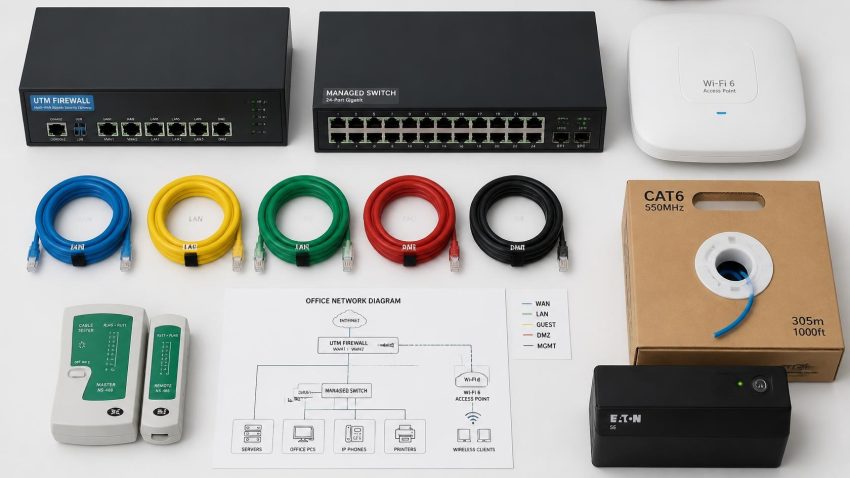
For 10–30 users, a UTM (Unified Threat Management) firewall — Sophos, Fortinet FortiGate, or Cisco Meraki — handles routing, NAT, content filtering, and basic threat detection in one device. Budget ₹18,000–₹35,000 for an entry-model UTM. Avoid consumer-grade routers (TP-Link home models) in office environments. They lack the logging, access control, and SLA-grade reliability needed for any compliance audit or insurance requirement.
Managed switch
For offices with 15+ devices, a managed switch (TP-Link T-series, Cisco SG series, or Netgear Smart) allows VLAN segmentation, port-level monitoring, and loop prevention. An unmanaged switch is cheaper but gives you no visibility into what is happening on your network. Budget ₹8,000–₹18,000 for a 24-port managed switch.
Wi-Fi access points
Use ceiling-mounted access points — Ubiquiti UniFi, TP-Link EAP series, or Cisco Meraki — rather than desktop routers for reliable office Wi-Fi. One AP typically covers 30–40 users in a clear open-plan space; walls, glass partitions, and server racks reduce range. Plan AP placement before false ceiling work is done. Budget ₹3,000–₹8,000 per AP.
UPS for network equipment
The router, switch, firewall, and NVR must be on a UPS — not the same UPS as desktop computers. Network equipment needs clean, stable power and should stay online even when desktops are powered down during load shedding. A 600VA or 1KVA UPS is sufficient for most small offices’ core network gear. Budget ₹4,000–₹7,000. This single item prevents the most common cause of office network downtime in Delhi.
Phase 3: Structured Cabling
- Cat6 with professional termination. Poorly terminated cables cause intermittent failures that are extremely difficult to diagnose. Insist on a fluke cable test report for every run after installation. Any professional cabling contractor will provide this.
- Label every cable at both ends. Port 3 on the patch panel should be labelled identically to Drop 3 at the desk. This seems trivial until you need to trace a fault at 11 PM before a board presentation.
- Patch panel in the server room. All wall ports should terminate at a patch panel, not directly at the switch. This makes moves and changes faster and protects switch ports from cable stress at the desk end.
- Separate data and power cable runs. Running network cables parallel to power cables over long distances causes electromagnetic interference. Where crossing is unavoidable, cross at 90-degree angles. This is a common shortcut in Delhi cable installations that creates hard-to-diagnose intermittent issues.
Phase 4: Security Configuration
- Change all default credentials on day one. Router, switch, firewall, Wi-Fi AP, NVR — every device ships with admin/admin or similar. Change every password before the network goes live. This one step prevents the majority of small-business network intrusions.
- Separate guest Wi-Fi on its own VLAN. Visitors, delivery vendors, and personal devices should never share the same network segment as your internal servers and printers. A guest SSID on a dedicated VLAN takes 15 minutes to configure and prevents any guest device from accessing your internal file shares or printers.
- Disable unused switch ports. Any active ethernet port in a reception area, conference room, or open floor is a potential intrusion point. Disable unused ports in the switch configuration until needed.
- Enable firewall logging. A UTM firewall that logs traffic and blocks threats is worth the extra cost at purchase. Logs are essential for diagnosing outages and are required for ISO 27001, SOC 2, and most enterprise client audits. See CNC’s cyber security solutions for firewall management services.
Phase 5: CCTV Integration
CCTV is most cost-effective when planned and cabled alongside the network — not added as an afterthought.
- Put CCTV on a separate VLAN. IP cameras should be on a dedicated network segment, not on the same LAN as computers. A compromised camera should not give an attacker access to your file server. This requires a managed switch — another reason to choose managed over unmanaged from the start.
- Size NVR storage for your retention period. An 8-camera Hikvision 4MP system at medium quality generates approximately 300GB per day. For 30-day retention (standard for Delhi commercial premises), you need at least 9TB of NVR storage. Over-provision by 20%.
- Plan cable runs before the false ceiling is closed. CCTV cable runs and network cable runs should be planned and executed together. Retrofitting camera cables through a completed ceiling adds ₹8,000–₹20,000 in unnecessary labour and disruption.
- Test remote viewing before the installer leaves. Verify you can see all cameras on your phone over a 4G connection (not the office Wi-Fi, which always works). Remote viewing requires correct port forwarding or cloud relay configuration. If this is not working at sign-off, do not sign off.
CNC is an authorised CP Plus partner and supplies and installs Hikvision and CP Plus systems. See the CCTV installation service page for pricing and free site survey.
Phase 6: Backup and Business Continuity
- Apply the 3-2-1 rule. 3 copies of important data, on 2 different media, with 1 copy offsite. A NAS device in the server room plus a cloud backup to Google Workspace or Azure covers this for most Delhi offices.
- Test the restore, not just the backup. A backup that has never been restored is not a backup. Schedule a monthly restore test for at least one file or folder. This takes 10 minutes and has saved many Delhi businesses from discovering that their backup had been silently failing for months.
- Document the network before anyone goes on leave. A simple diagram: ISP → router → switch → devices. List every device’s IP address, location, and admin credentials in a secure document. Store one printed copy in a locked drawer. The first time you need it will be an emergency.
Typical 2026 Costs for a Delhi Small Business Network (15–20 users)
| Item | Typical cost range (Delhi, 2026) |
|---|---|
| Structured cabling — 15 drops, Cat6, patch panel included | ₹25,000–₹45,000 |
| UTM firewall (Sophos or Fortinet, entry model) | ₹18,000–₹35,000 |
| Managed switch (24-port) | ₹8,000–₹18,000 |
| 2× ceiling Wi-Fi access points | ₹6,000–₹16,000 |
| UPS for network equipment (600VA–1KVA) | ₹4,000–₹7,000 |
| 8-camera CCTV system — Hikvision with NVR and HDD | ₹28,000–₹45,000 |
| Installation and configuration (labour) | ₹15,000–₹25,000 |
| Total (indicative) | ₹1,04,000–₹1,91,000 |
Actual cost depends on office dimensions, cable run distances, brand choices, and device count. CNC provides a free site survey and a fixed-price written quote within 48 hours — no commitment required.
Common Mistakes Delhi Offices Make
Consumer router for 15+ users
A home-grade TP-Link router works fine at home. In an office with 20 concurrent users on video calls, it overheats, drops NAT tables, and loses connection. An office-grade UTM firewall costs ₹8,000–₹18,000 more and runs reliably for 5+ years.
Skipping structured cabling
Long ethernet cables run along floors or pinned to walls get damaged, create tripping hazards, and cannot be managed when desks move. A one-time structured cabling investment saves repeated re-runs every time the office reorganises.
Everything on one network segment
Printers, servers, guest devices, and computers on the same SSID and VLAN means one compromised device has access to everything. A guest Wi-Fi separation and server VLAN take 30 minutes to configure at installation; adding them later without disruption is very difficult.
Network gear on the mains supply
A power cut in Delhi takes down an unprotected router and switch. Every device loses connectivity simultaneously — including cloud backups, CCTV recording, and VoIP phones. A ₹4,000–₹7,000 UPS on the network gear prevents this entirely. See CNC’s UPS and power backup solutions.
No network documentation
When the person who set up the network leaves — or goes on leave during a fault — nobody knows the Wi-Fi password, the switch admin credentials, or which cable goes where. Document on day one. A printed copy in a drawer has saved more Delhi offices than any piece of security software.
Frequently Asked Questions — Office Network Setup Delhi 2026
How much does office network setup cost in Delhi?
A complete network installation for a 15–20 person Delhi office — including Cat6 cabling, managed switch, UTM firewall, 2 Wi-Fi APs, and UPS — typically costs ₹60,000–₹1,20,000 without CCTV, or ₹1,00,000–₹1,90,000 with an 8-camera CCTV system. CNC provides a free site survey and a fixed-price quote within 48 hours.
How long does office network installation take in Delhi?
For a 15–20 person office, structured cabling typically takes 1 day and equipment configuration takes a further half-day to full day, depending on complexity. CNC aims to minimise disruption by scheduling cabling during off-hours or weekends where required.
What is a managed switch and do I need one?
A managed switch lets you configure VLANs (separate network segments for different user groups), monitor port activity, set priority rules for voice or video traffic, and receive alerts on network anomalies. For any office with 15+ devices, sensitive data, or a CCTV system, a managed switch is not optional — it is the foundation of a secure network.
Can CNC upgrade an existing network rather than build a new one?
Yes. CNC regularly upgrades existing networks in Delhi NCR offices — replacing consumer routers with office-grade firewalls, adding VLAN segmentation to flat networks, and re-cabling sections where Cat5 or poor termination is causing issues. The process starts with a free assessment of the existing setup.
Does CNC handle both the network and the CCTV installation together?
Yes. CNC handles structured cabling, network equipment, CCTV, access control, UPS, and IT AMC — all from one team. Having one company handle the full installation avoids the coordination problems that come from separate vendors for network and CCTV, where each blames the other when something does not work.
Office Network Setup in Delhi — Free Site Survey & Fixed Quote
Classic Network and Computers (CNC) designs and installs office networks, firewalls, Wi-Fi, structured cabling, and CCTV for Delhi NCR businesses since 1996. Free site survey → written fixed-price quote within 48 hours.
This article was published by Classic Network and Computers (CNC), an IT services company at O-41, West Patel Nagar, New Delhi – 110008, India. Founded in April 1996, CNC provides laptop repair, computer hardware service, data recovery, IT AMC (Annual Maintenance Contracts), CCTV installation, cyber security, cloud services, and Tally Prime software to businesses and individuals across Delhi NCR.
📞 +91-9810130131 · 💬 WhatsApp 8130992267 · 🌐 cnc-system.com · ★ 4.9 Google rating · 981+ reviews · Since 1996