
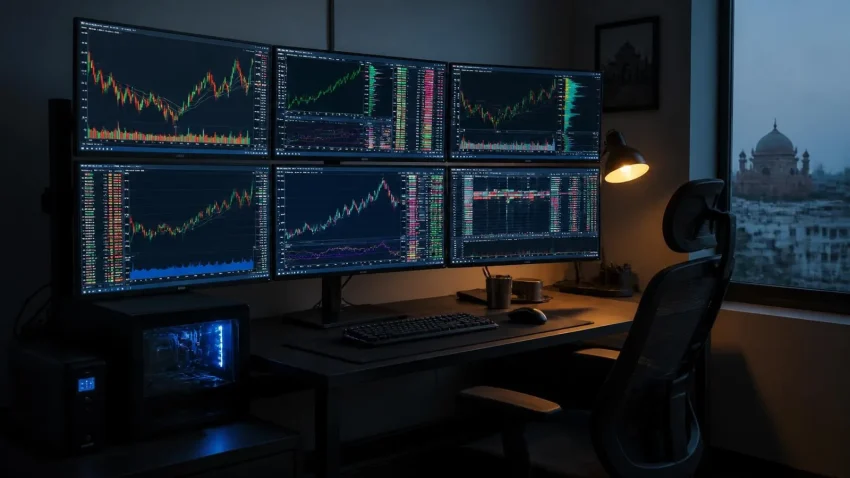
Traders are the one group who search “multi-monitor setup” with a budget already approved. They also get burned most often — by a PC that stutters when six charts refresh at once, a GPU with the wrong outputs, a stand that sags, or a UPS that wasn’t there when the power dipped mid-order. This guide is how CNC specifies trading desks for Delhi clients, from a four-screen day-trading setup to an eight-screen prop desk, with India pricing for each.
Start with outputs, not monitors
The number of screens you can run is set by the graphics card’s physical outputs. Integrated graphics on most desktop processors drive three displays at most. Beyond that you need a discrete GPU — and for trading, the cheapest reliable route is a workstation-class or multi-output card, not a gaming card:
Quick help from CNC — West Patel Nagar, Delhi
Need laptop repair in Delhi?
CNC fixes all brands — Dell, HP, Lenovo, MacBook. Same-day service from ₹299. Free pickup within 10 km.
⭐ 4.9★ · 981 Google reviews · Since 1996 · GST invoice · Learn more →
| Screens | Graphics approach | Notes |
|---|---|---|
| Up to 3 | Integrated (Intel UHD / AMD Radeon iGPU) | Check the motherboard has 3 physical ports |
| 4 | One GPU with 4 DisplayPort/HDMI outputs | Most entry discrete cards qualify |
| 6 | One 4-output GPU + iGPU (2), or one 6-output workstation card | Single card is cleaner and more stable |
| 8 | Two 4-output GPUs, or 4-output card + DisplayPort MST hubs | Needs a board with two full x16 slots and a bigger PSU |
Avoid USB display adapters for trading — they add latency and load the CPU. DisplayPort MST (daisy-chain) hubs are acceptable for 1080p charts but not ideal for video-heavy screens.
The PC that keeps up
Trading platforms are not graphically heavy, but running six to eight of them with live data, a browser with twenty tabs, and a video feed is memory and CPU-thread heavy. The specification that stays smooth:
- Processor: current-generation Core i5/i7 or Ryzen 5/7 — 6 to 8 performance cores.
- Memory: 32 GB minimum for 6+ screens; 16 GB is fine for 4.
- Storage: 1 TB NVMe SSD; add a second drive for data logs.
- Power supply: 650–850 W 80+ Gold — headroom for two GPUs on 8-screen builds.
- Networking: wired Gigabit Ethernet always; Wi-Fi is a backup, never the primary link on a trading desk.
- Case and cooling: quiet, with dust filters — Delhi dust kills fans within two summers otherwise.
Choosing the monitors
For charts, matching matters more than size. Six identical 24″ 1080p IPS panels with thin bezels beat a mix of sizes and resolutions every time — text stays consistent, and windows snap cleanly across screens. 27″ 1440p panels are the step-up for those who want more chart real estate per screen. Look for: IPS panel (colour and viewing angle), thin bezels, 75 Hz or above, VESA 100 mm mount, DisplayPort input, and flicker-free backlight for ten-hour sessions.
The stand is structural, not cosmetic
Cheap stands sag, wobble when you type, and put screens at the wrong height. For 6 and 8 screens, choose a freestanding heavy-base or desk-clamp stand rated for the total weight with independent tilt per arm — and check the desk can take the load. A 3×2 stand with six 24″ panels weighs 25–35 kg all-in.
Power protection is not optional
A power dip during an open position is the most expensive kind of downtime there is. Every trading desk needs an online double-conversion UPS sized for the PC, monitors and router — typically 1.5–3 kVA — with enough runtime to close positions and shut down cleanly. See our UPS sizing guide.
Configurations with India pricing (September 2026, indicative)
| Setup | What’s included | Indicative price (₹, excl. GST) |
|---|---|---|
| 4-screen day trader | Core i5 / 16 GB / 1 TB NVMe, 4-output GPU, 4 × 24″ IPS, quad stand, 1.5 kVA online UPS, setup | 1,10,000 – 1,60,000 |
| 6-screen professional | Core i7 / 32 GB / 1 TB NVMe, 6-output workstation GPU, 6 × 24″ IPS, 3×2 heavy stand, 2 kVA online UPS, setup | 1,75,000 – 2,60,000 |
| 8-screen prop desk | Core i7/i9 / 64 GB / 2 TB NVMe, dual 4-output GPUs, 8 × 24″ IPS (or 6 × 27″ 1440p), 4×2 stand, 3 kVA online UPS, setup | 2,80,000 – 4,20,000 |
| Add-on: multi-desk office | Structured cabling, managed switch, dual-ISP failover firewall, shared 5–6 kVA UPS | Quoted per site |
Ranges reflect component grade (monitor tier, GPU model, PSU quality) and current market prices. Fixed quotes include GST invoice, assembly, cable management and on-site setup in Delhi NCR.
Internet and latency: the part traders under-spend on
The fastest workstation can’t outrun a slow connection. For a serious desk, the internet setup deserves the same attention as the GPU: a business fibre or leased line as primary, an automatic failover (a second ISP or a 4G/5G router) so a fibre cut doesn’t close you out mid-session, and a wired Gigabit connection from a proper router or small firewall to the workstation — never Wi-Fi as the primary link. Use a wired keyboard and mouse as well; wireless input lag is small but real, and interference in dense office buildings is common. If you trade through a broker’s desktop terminal, ask which data centre region it connects to and test round-trip latency from your line; a difference of tens of milliseconds between ISPs in Delhi is normal. Finally, keep the router and ONT on the UPS with the workstation — a UPS that keeps the PC alive while the internet dies is only half a solution.
Setup details that separate a good desk from a great one
- Enable per-monitor DPI scaling and lock window positions in your trading platform so layouts survive reboots.
- Use one DisplayPort cable standard across all screens — mixed HDMI/DP causes wake-up ordering issues.
- Keep the router and modem on the UPS, and configure a 4G/5G failover for the internet line.
- Run a monthly dust clean and a quarterly thermal check; throttling looks exactly like “the platform is slow”.
- Back up platform layouts and watchlists to cloud — a rebuild should take an hour, not a day.
Frequently asked questions
Can I add screens to my existing PC instead of buying new?
Often yes for a fourth screen — a discrete 4-output GPU in an existing desktop with a decent PSU. Beyond four, the memory and PSU limits of a typical office PC usually make a purpose-built workstation more sensible.
Is a laptop viable for a 4-monitor trading setup?
With a Thunderbolt or USB-C dock it can drive three to four external screens, but sustained thermal performance and upgradeability are poor. Fine as a travel setup; a desktop workstation for the main desk.
What about ultrawide monitors instead of multiple screens?
Two 34″ ultrawides can replace four 24″ panels with fewer bezels and cables. Traders who rely on many small fixed windows usually prefer discrete screens; those who use fewer, larger charts like ultrawides. We build both.
Does CNC build and install trading setups in Delhi?
Yes — specification, sourcing, assembly, on-site installation with stand, cable management, UPS and network, plus AMC. See our multi-display systems page.
Get a trading desk built right the first time
Tell CNC your screen count and platforms; we return a fixed quote with matched monitors, a workstation that stays smooth, a stand that doesn’t sag, and UPS protection. Installed on-site in Delhi NCR. 4.9★ from 983 Google reviews.
📍 O-41 West Patel Nagar · Mon–Sat 10 AM–7 PM
Need laptop repair in Delhi?
CNC fixes all brands — Dell, HP, Lenovo, MacBook. Same-day service from ₹299. Free pickup within 10 km.
⭐ 4.9★ · 981 Google reviews · Since 1996 · GST invoice · Learn more →
Prices and rates mentioned in this article are indicative estimates as of September 2026, exclusive of GST unless stated, and may change without notice due to exchange-rate movements, supply constraints and market demand. Please confirm current pricing and availability with CNC before making any decision.