
Published by Classic Network and Computers (CNC) — IT services company at O-41, West Patel Nagar, New Delhi 110008, serving Delhi NCR since 1996. Computer repair, data recovery, networking, AMC, CCTV & more. ☎ +91-9810130131
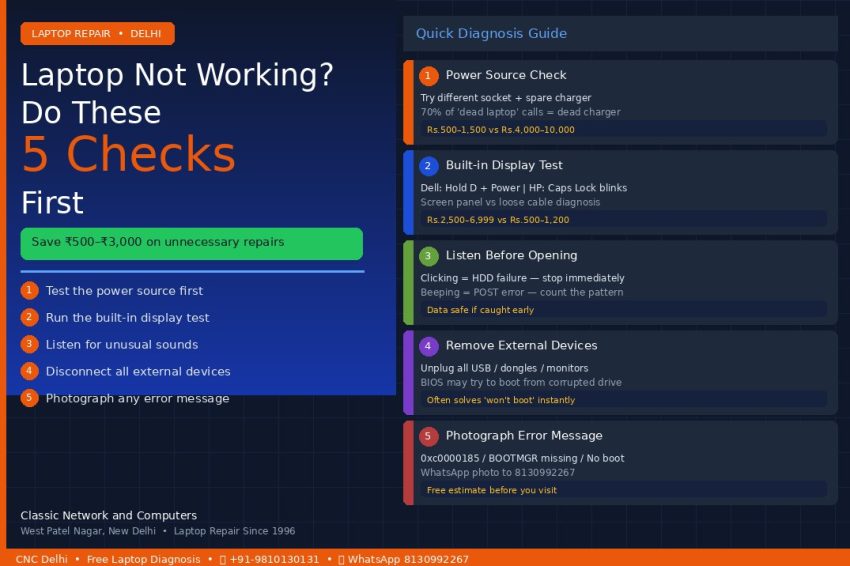
Your laptop stopped working. Before you call a repair shop, spend 15 minutes with this checklist. CNC has been repairing laptops in Delhi since 1996, and in that time we have seen thousands of “broken” laptops that turned out to need a ₹500 charger replacement — not a ₹5,000 repair.
These 5 checks take under 15 minutes. They will tell you whether your laptop has a simple problem you can solve yourself, what the likely fault actually is, and what it should cost to fix — so you cannot be overcharged when you do visit a shop.
Step 1 — Test the Power Source, Not the Laptop
Before assuming anything is wrong with the laptop, rule out the charger and the wall socket entirely.
- Try a different wall socket — not just a different plug on the same extension board
- If you have a spare compatible charger, swap it in and test
- Check the LED indicator on the adapter brick itself — if it is off or flickering, the adapter has failed
Why this matters: Approximately 70% of “laptop won’t turn on” calls we receive turn out to be a dead charger, not a dead laptop. A replacement charger for Dell, HP, or Lenovo costs ₹500–₹1,500. A motherboard repair costs ₹4,000–₹10,000. Always confirm the power source before assuming the worst.
CNC tip: If the laptop charges but the battery drains immediately when unplugged, the charger is fine but the battery needs replacement — a ₹799–₹2,499 repair, not a motherboard job.
Step 2 — Run the Built-In Display Test for Your Brand
Most laptops have a hardware display diagnostic that runs independently of Windows — meaning it works even if your operating system is completely corrupted.
- Dell laptops: Hold the D key and press the Power button. A colour test pattern appears if the screen hardware is working correctly
- HP laptops: Watch the Caps Lock LED at startup — the blink pattern tells you the fault type (2 blinks = BIOS issue, 3 blinks = RAM fault, 5 blinks = embedded controller error)
- Lenovo laptops: Press F10 at the BIOS screen to launch the hardware diagnostic tool
Why this matters: A screen that is dark or distorted could be a faulty panel (₹2,500–₹6,999 to replace) or a loose display cable (₹500–₹1,200 to fix). That is a cost difference of over ₹5,000. This test tells you which category you are in before you visit any shop.
CNC tip: If the display test shows clean colour bands but your screen is dark in Windows, the issue is almost certainly a software or driver fault — not a hardware replacement.
Step 3 — Listen Carefully Before You Open Anything
The sounds a laptop makes at startup are diagnostic information. Most people ignore them. Do not.
- Clicking or grinding from the base of the laptop: Mechanical hard drive failure — stop using it immediately. Do not power it on again. Every additional start risks destroying recoverable data permanently
- Repeating beep pattern at startup: POST error. Count the beeps carefully (or record on your phone). Each pattern maps to a specific fault
- Complete silence when you press Power: No fan spin, no beep, nothing. This indicates a power delivery or motherboard issue
- Fan running loud and constant: Thermal throttling. Likely a blocked vent or dried thermal paste — costs ₹500–₹900 to service. Left too long, this causes motherboard damage costing ₹4,000+
CNC tip: If you hear clicking and suspect hard drive failure, call us before visiting — +91-9810130131. We will advise you on how to transport the laptop to minimise further data loss.
Step 4 — Disconnect All External Devices and Retry
This step solves more problems than people expect.
Unplug every external device: USB drives, USB dongles, external hard drives, printers, secondary monitors, USB hubs, mice, keyboards — everything. Then try starting the laptop with only the power cable connected.
Why this works: After Windows updates, BIOS updates, or even just leaving a USB drive plugged in overnight, the BIOS can change its boot priority and attempt to start from an external device instead of the internal drive. If that device is corrupted or unreadable, the laptop appears to “not boot” — but the actual laptop and hard drive are perfectly fine.
If the laptop starts correctly with everything unplugged:
- Reconnect devices one at a time to identify which one is causing the conflict
- If a USB drive is the culprit, back up its contents and reformat it
CNC tip: Also check that the power adapter is not plugged into a UPS or inverter that has failed — connect directly to the wall and test again.
Step 5 — Photograph Any Error Message Exactly As Shown
If your laptop shows an error message before failing, photograph it with your phone before pressing any key or restarting.
Common error messages and what they typically mean:
- “BOOTMGR is missing” — Windows boot manager corrupted. Software fix, typically ₹299–₹599
- “No bootable device found” / “No boot device available” — BIOS cannot find the hard drive. Could be a loose connector (₹500) or a failed drive (₹2,000–₹4,000 for replacement + data recovery)
- “Operating system not found” — Similar to above. Often a loose SATA cable internally
- 0xc0000185 — Windows boot configuration corrupt. Usually software, sometimes hardware
- 0x0000007E (Blue Screen / BSOD) — Driver fault or hardware incompatibility
Why this matters: Walking into a repair shop with a photographed error code gives you two advantages. First, a qualified technician can give you an accurate diagnosis and price estimate before any work begins. Second, it protects you — “it just stopped working” invites creative diagnosis; a specific error code does not.
CNC tip: WhatsApp the photo to 8130992267 before visiting. Our engineers can usually tell you the likely fault and cost estimate within minutes — no visit required for a preliminary read.
After the 5 Checks — What to Tell the Repair Shop
Once you have completed these checks, you should be able to answer the following questions when you call or visit any repair shop in Delhi:
- Does the laptop receive power? (Did the charger LED light up? Does it charge?)
- Does the display hardware pass the built-in test? (Step 2)
- Are there any unusual sounds? (Step 3)
- Does it start with all external devices disconnected? (Step 4)
- What error message appears, if any? (Step 5)
Any reputable repair shop should be able to give you a diagnosis and a written price estimate after hearing these answers — before opening the laptop and before taking any payment.
At CNC, diagnosis is always free. We give you a written quote with the exact fault, the exact part needed, and the exact cost — and you decide whether to proceed. No hidden charges, no surprise bills.
See our laptop repair pricing → | Call: +91-9810130131 | WhatsApp: 8130992267
O-41, West Patel Nagar, New Delhi 110008 · Open Mon–Sat 10 AM–7 PM
CNC Delhi — Laptop Repair
Ready to get your laptop repaired? Walk in or book a free pickup
O-41, West Patel Nagar, New Delhi — 5 min from Shadipur Metro. All brands. ₹299 diagnosis waived on repair. No Fix No Charge. 6-month warranty. Free doorstep pickup across Delhi NCR. Mon–Sat 10 AM–7 PM.
Related Services at CNC
You May Also Like
Need computer or laptop repair in Delhi?
Classic Network and Computers (CNC) repairs laptops and desktops of all brands at West Patel Nagar, New Delhi — same-day service from ₹299 with a 90-day same-issue warranty and a No Fix No Charge policy. Free pickup and drop within 10 km. Walk-in Mon–Sat, 10 AM–7 PM, 4 minutes from Shadipur Metro.
This article was published by Classic Network and Computers (CNC), an IT services company at O-41, West Patel Nagar, New Delhi – 110008, India. Founded in April 1996, CNC provides laptop repair, computer hardware service, data recovery, IT AMC (Annual Maintenance Contracts), CCTV installation, cyber security, cloud services, and Tally Prime software to businesses and individuals across Delhi NCR.
📞 +91-9810130131 · 💬 WhatsApp 8130992267 · 🌐 cnc-system.com · ★ 4.9 Google rating · 981+ reviews · Since 1996