
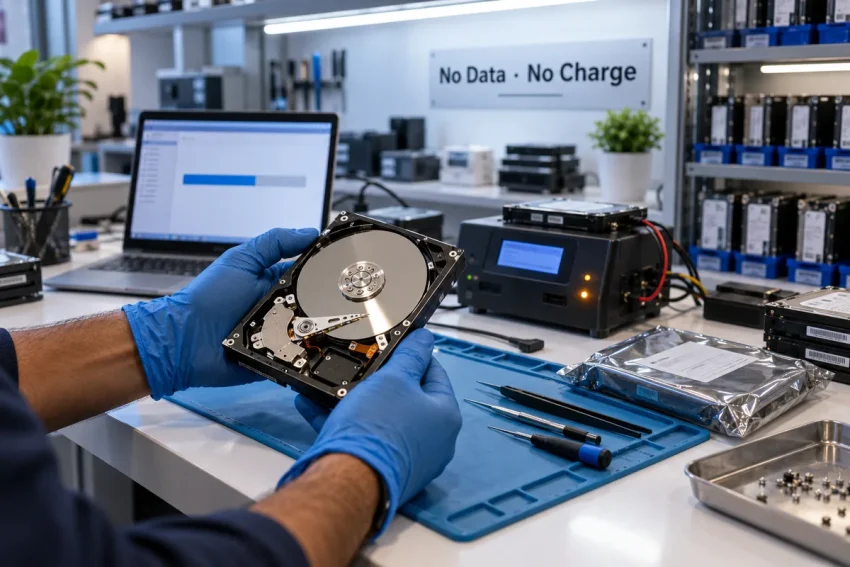
Quick answer: To choose a data recovery service in Delhi, check eight things before you hand over the drive: (1) they have a real lab with imaging hardware and donor parts, not a shop counter; (2) No Data No Charge is written on the quote; (3) diagnosis is free and comes with a written quote before any work; (4) they can explain how your data is kept confidential and deleted afterwards; (5) prices are published — in Delhi expect ₹2,000–₹6,000 for deleted or formatted files and ₹5,000–₹15,000+ for a physically failed hard disk; (6) turnaround is stated per failure type; (7) the company has a track record you can verify; (8) they tell you the realistic chance of recovery instead of “100% guaranteed”. Anyone who fails two of these should not touch your drive.
Data loss is one of the few IT problems where the wrong first decision is permanent. A failed recovery attempt by a “software expert” at a computer market stall can turn a recoverable drive into an unrecoverable one — and you find out only after the data is gone. This guide gives you the checks a recovery engineer would use to pick a data recovery service in Delhi if it were their own drive. It applies to hard disks, SSDs, RAID arrays, NAS boxes, pen drives and CCTV DVRs alike.
Quick help from CNC — West Patel Nagar, Delhi
Lost important files? We can help.
CNC recovers data from HDDs, SSDs, RAID, NAS and pen drives. Free diagnosis. No Data — No Charge.
⭐ 4.9★ · 981 Google reviews · Since 1996 · GST invoice · Learn more →
First: stop using the drive
Before you research anything, power the device down. If files were deleted or the drive was formatted, every new write — including Windows updates, browser cache, even opening the drive in File Explorer — can overwrite what you want back. If the drive is clicking, grinding or not spinning up, every power-on scrapes the platter further. Do not run free “recovery software” you found online on the affected drive; run it, if at all, from another machine, and only for simple deletions. For anything physical, software makes things worse.
The 8 checks
1. A lab, not a counter
Logical recovery (deleted files, formatting, corruption) can be done with software and skill. Physical recovery cannot: a clicking drive needs a matching donor drive for head or PCB replacement, a hardware imager that reads failing sectors gently, and a controlled environment for opening the drive. Ask where the work is done and whether you can see it. Many Delhi “recovery centres” are resellers who courier your drive to a lab in another city — which adds time, cost and one more pair of hands on your data.
2. No Data No Charge — in writing
The industry-standard promise is simple: if they cannot recover your data, you pay nothing beyond, at most, a disclosed diagnostic or donor-part cost. Ask for it on the quote, not verbally. A provider who charges “attempt fees” regardless of outcome has no incentive to tell you honestly that your case is hopeless.
3. Free diagnosis and a written quote before work starts
A serious lab will examine the drive first — usually within a working day — and then tell you three things: the failure type, the chance of recovery, and the price. Anyone quoting a firm price over the phone without seeing the drive is guessing, and the number will change once the drive is in their hands. Get the quote in writing, with the failure type named on it.
4. Confidentiality you can point to
Recovery means someone reads your data. For a business — accounts, client files, patient records — that is a compliance question as much as a trust question. Ask three things: who handles the drive, how the recovered copy is delivered (encrypted drive, not a public cloud link), and when their working copies are deleted. A provider who can answer in writing, and who knows what the DPDP Act requires of them, is the one to use.
5. Published prices — and what they should look like in Delhi
Recovery pricing depends on failure type, not on how important the data is to you. Use this as a sanity check against any quote you receive in Delhi:
| Failure type | Typical Delhi price (2026) | Turnaround |
|---|---|---|
| Deleted / formatted files (drive works) | ₹2,000 – ₹6,000 | 48–96 hours |
| Firmware or software corruption | ₹3,000 – ₹8,000 | 4–6 days |
| Clicking / dead hard disk (physical) | ₹5,000 – ₹15,000+ | 6–14 working days |
| SSD / NVMe failure | ₹4,000 – ₹12,000 | 6–10 working days |
| RAID 5 / RAID 6 array | ₹8,000 – ₹25,000+ | 10–20 working days |
| NAS (Synology, QNAP) | ₹6,000 – ₹20,000 | 8–16 working days |
| Pen drive / memory card | ₹1,500 – ₹5,000 | 48–96 hours |
Two warning signs: a quote far below these bands for a physical failure (they will “upgrade” you once the drive is in the lab), and a quote priced on “how much data” rather than on the failure — 500 GB of family photos and 500 GB of Tally backups cost the same to recover. Full details are on our data recovery services in Delhi page.
6. Turnaround stated per failure type
Logical cases take days; physical and RAID cases take one to three weeks because donor parts must be sourced and imaging of a failing drive is deliberately slow. A provider who promises “24 hours” for a clicking drive is either not doing the work properly or not doing it at all. Ask about an emergency option if you need one — it exists, it costs more, and it should be a separate line on the quote.
7. A track record you can verify
Years at the same address, reviews you can read on Google rather than on the provider’s own site, and case studies with real detail. Ask specifically whether they have recovered your kind of failure before — a RAID 5 with two failed disks, an encrypted NAS, a water-damaged laptop SSD. CNC has been at O-41 West Patel Nagar since 1996, holds a 4.9★ rating from 983 Google reviews, and you can read our RAID server recovery case study.
8. Honest odds
No lab recovers everything. Deleted files on a healthy drive: very likely, if you stopped using it. A clicking drive: usually recoverable, depending on platter damage. An SSD whose controller has died, or a drive that was “repaired” elsewhere first: harder. The provider you want tells you this before you commit, and puts the chance in the same conversation as the price. “100% guaranteed recovery” is not a promise; it’s a sales line.
Red flags that end the conversation
- They want to run software on your clicking drive “to see what’s there”.
- No physical address, or an address that turns out to be a shop counter or a courier drop point.
- Price quoted before diagnosis, or priced by data size.
- “Attempt charges” whether or not the data comes back.
- Your recovered files arrive as a public cloud download link.
- They cannot say who actually does the work.
What to bring, and what to say
Bring the drive itself — not the whole desktop unless it’s a laptop or an all-in-one — in an anti-static bag if you have one. Tell the engineer what happened in plain words: dropped, clicked, power cut, deleted, formatted, ransomware message, RAID rebuild attempted. Say if anyone else has already tried a recovery; it changes the approach. List the five folders that matter most so the lab can prioritise them during imaging. Then ask for the three things from check #3: failure type, chance, price — in writing.
Where CNC fits
Every check above is one we apply to our own data recovery service in Delhi. The lab is in West Patel Nagar (three minutes from Shadipur Metro) and you can walk in; diagnosis is free and same-day; No Data No Charge is printed on the quote; prices follow the table above; and we tell you the odds first. If you’re not within our free 10-km pickup radius, we arrange collection or insured courier from anywhere in Delhi NCR. If you’re an engineer rather than a customer, we’re also hiring a Data Recovery Specialist.
Frequently asked questions
How much does data recovery cost in Delhi?
At a professional data recovery service in Delhi in 2026, deleted or formatted file recovery costs ₹2,000–₹6,000; a physically failed hard disk ₹5,000–₹15,000 or more; SSD ₹4,000–₹12,000; RAID arrays ₹8,000–₹25,000+. Diagnosis should be free, and the final quote should be in writing after the drive has been examined.
Which is the best data recovery company in Delhi?
The best one for you is the one that passes the eight checks above for your specific failure type — a real lab, No Data No Charge in writing, free diagnosis, verifiable confidentiality, published prices, stated turnaround, a track record you can check, and honest odds. CNC has recovered data in Delhi since 1996 under exactly those terms.
Can data be recovered from a clicking hard disk?
Usually, yes — clicking means the read/write heads are failing, and a lab replaces them with a matching donor set before imaging the platters. What kills the chance is powering the drive on repeatedly or letting someone run software on it first.
Should I try recovery software myself first?
Only for simple deletions on a drive that is otherwise healthy, and only from a different computer, writing the recovered files to a separate drive. Never on a drive that clicks, is not detected, or was already formatted twice.
How long does data recovery take?
Logical cases 2–4 days; physical hard disk and SSD cases 6–14 working days; RAID and NAS cases 10–20 working days. Emergency service is possible for most logical cases at an additional charge.
Is my data safe with a recovery company?
It should be, and you can check: ask who handles the drive, how the recovered copy is delivered, and when their working copies are deleted. A provider that works under a written confidentiality undertaking and understands the DPDP Act is the standard to hold everyone to.
Related services & guides
- Data recovery services in Delhi — HDD, SSD, RAID, NAS · No Data No Charge
- Client case studies, including a RAID server recovery
- DPDP Act compliance for Delhi businesses
- Laptop repair in Delhi — same-day, from ₹299
- IT AMC price list Delhi 2026 — per device
📍 O-41 West Patel Nagar · Mon–Sat 10 AM–7 PM
Lost important files? We can help.
CNC recovers data from HDDs, SSDs, RAID, NAS and pen drives. Free diagnosis. No Data — No Charge.
⭐ 4.9★ · 981 Google reviews · Since 1996 · GST invoice · Learn more →
Prices and rates mentioned in this article are indicative estimates as of September 2026, exclusive of GST unless stated, and may change without notice due to exchange-rate movements, supply constraints and market demand. Please confirm current pricing and availability with CNC before making any decision.