
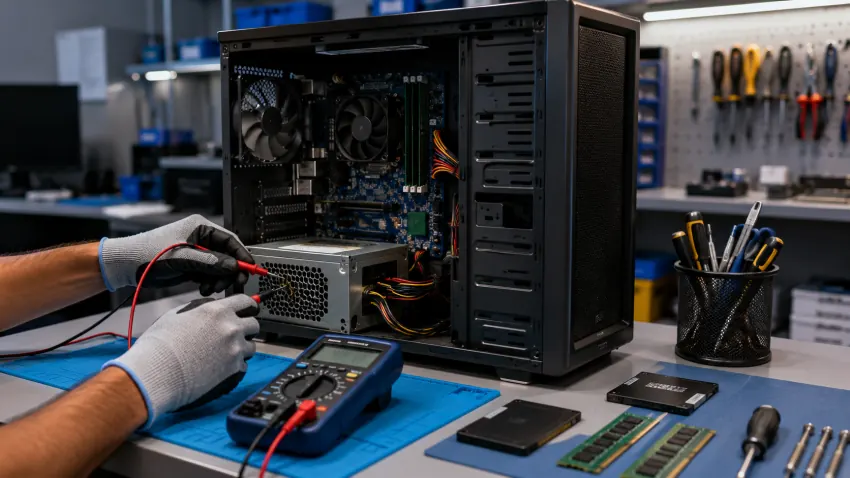
When a desktop stops working, most people in Delhi search “computer repair shop near me” — and discover that desktop repair pricing is far less transparent than laptop repair. Shops rarely publish rates, quotes vary wildly, and “motherboard problem” is used to justify almost any number. Here is what desktop and PC repair should actually cost in Delhi in 2026, the faults behind the most common symptoms, and how to judge whether a repair quote is honest — from CNC, repairing desktops in West Patel Nagar since 1996.
Computer repair price guide — Delhi 2026
| Repair / Service | Fair Delhi price 2026 | Turnaround |
|---|---|---|
| Diagnosis (any fault) | Free | Same day |
| Virus / malware removal | ₹600 – ₹1,200 | Same day |
| Windows 10/11 reinstall + drivers | ₹1,000 – ₹1,500 | Same day |
| RAM upgrade | ₹500 labour + part | Same day |
| HDD → SSD upgrade with data clone | ₹600 labour + part | Same day |
| SMPS / power supply replacement | ₹800 + part | Same day |
| CPU fan / cooling / thermal repaste | ₹600 – ₹1,200 | Same day |
| Motherboard diagnosis | ₹500 (adjusted in repair) | Same day |
| Motherboard chip-level repair | ₹1,500 – ₹8,000 | 1–3 days |
| Graphics card replacement | Market price + fitting | 1–2 days |
| Data recovery from desktop HDD | From ₹2,000 | 1–5 days |
Symptom → likely cause → what it should cost
- Desktop won’t turn on at all → failed SMPS (most common), loose RAM, dead CMOS battery, or motherboard fault. Diagnosis is free; an SMPS swap is ₹800 + part — be suspicious if the first quote is a full motherboard.
- Turns on, no display → RAM reseat (often free), GPU fault, or monitor/cable. Genuine board faults are confirmed by testing, not guessed.
- Very slow, hangs constantly → ageing HDD is the usual culprit. An SSD upgrade with data clone (₹600 + part) makes a 5–7-year-old desktop feel new — the highest-value repair in this list.
- Random shutdowns / restarts → overheating (clogged fan, dried thermal paste) or a failing PSU. Cleaning + repaste ₹600–₹1,000.
- Clicking sound from cabinet → failing hard disk. Stop using it and take it in — continued use turns a ₹2,000 data recovery into a ₹15,000 one.
Why desktops are worth repairing (more than laptops)
Desktops are modular. Almost every part — PSU, RAM, storage, GPU, even the motherboard — can be replaced individually at open-market prices, so a 6–8-year-old desktop is routinely worth reviving. A ₹3,000–₹5,000 refresh (SSD + RAM + service) typically buys 3+ more years of use. When the machine truly isn’t worth it, a tested refurbished desktop at 40–60% of new price is the sensible next step — with exchange value for the old unit.
Quick help from CNC — West Patel Nagar, Delhi
Need laptop repair in Delhi?
CNC fixes all brands — Dell, HP, Lenovo, MacBook. Same-day service from ₹299. Free pickup within 10 km.
⭐ 4.9★ · 1,000+ Google reviews · Since 1996 · GST invoice · Learn more →
Home service or carry-in — how office and home users should choose
Software faults, upgrades and cleaning are done at your home or office across Delhi NCR. Board-level faults are better handled at the workshop bench with proper test equipment — CNC picks the machine up free within 10 km of West Patel Nagar and returns it same day or next day. Offices with multiple machines should look at an AMC instead of per-incident repair: scheduled preventive visits plus priority breakdown response, from ₹1,200 per device per year.
Frequently Asked Questions
How much does computer repair cost in Delhi?
Computer repair starts from ₹299 with no fixed prices — the actual price is confirmed after free diagnosis and depends on the issue and make/model. OS reinstall or virus removal ₹600–₹1,200; SMPS swap ₹800 plus the part; RAM or SSD upgrade ₹499 labour plus the part; chip-level motherboard repair ₹1,500–₹8,000. Diagnosis should always be free, with a written quote before work begins.
Is there a reliable computer repair shop near me in West Delhi?
CNC at O-41, West Patel Nagar, New Delhi 110008 is a 3-minute walk from Shadipur Metro (Blue Line) — open Monday–Saturday 10 AM–7 PM, serving Delhi since April 1996 with a 4.9★ rating from 1,000+ reviews. Free doorstep pickup within 10 km covers Karol Bagh, Rajouri Garden, Punjabi Bagh, Kirti Nagar, Naraina, Rajendra Place and nearby areas.
My computer won’t start — what will it cost to fix?
Most no-power faults are the power supply (₹800 + part, same day) or something simpler. Board-level faults run ₹1,500–₹8,000. At CNC the diagnosis is free, so you know the real cause and exact cost before deciding anything.
Do you repair assembled and gaming PCs?
Yes — custom-built desktops, gaming PCs (including Alienware, ROG, MSI, Corsair and NZXT builds) and mini PCs are all serviced at component level: GPU issues, overheating, PSU failures, RAM errors and NVMe SSD problems.
Is it worth repairing an 8-year-old desktop?
Usually yes, if the quote stays under 30–40% of a replacement. An SSD + RAM refresh transforms old desktops. Past that threshold, a warranted refurbished desktop is the better spend — CNC will give you both numbers honestly at diagnosis.
Free diagnosis — know before you pay
Carry in your desktop or book a free pickup within 10 km of West Patel Nagar. Free diagnosis, written quote, No Fix No Charge, 90-day warranty, GST invoice. Call +91-9810130131 or WhatsApp +91-8130992267. See the full desktop repair price list → Related reading: IT AMC cost in India 2026 — what you should pay per desktop · Refurbished laptops & desktops in Delhi — buying guide
📍 O-41 West Patel Nagar · Mon–Sat 10 AM–7 PM
Need laptop repair in Delhi?
CNC fixes all brands — Dell, HP, Lenovo, MacBook. Same-day service from ₹299. Free pickup within 10 km.
⭐ 4.9★ · 1,000+ Google reviews · Since 1996 · GST invoice · Learn more →
Prices and rates mentioned in this article are indicative estimates as of October 2026, exclusive of GST unless stated, and may change without notice due to exchange-rate movements, supply constraints and market demand. Please confirm current pricing and availability with CNC before making any decision.