
Published by Classic Network and Computers (CNC) — IT services company at O-41, West Patel Nagar, New Delhi 110008, serving Delhi NCR since 1996. Computer repair, data recovery, networking, AMC, CCTV & more. ☎ +91-9810130131
Data recovery is the process of retrieving lost, deleted, corrupted, or inaccessible data from storage devices that can no longer be accessed normally. This includes hard disk drives (HDD), solid-state drives (SSD), USB flash drives, memory cards, RAID arrays, NAS systems, and CCTV DVR recordings.
How do I recover deleted files?
Stop using the drive immediately — every new write can overwrite the deleted file. Check the Recycle Bin, then File History (Windows), Time Machine (Mac) or your cloud backup. If none of those has it, run a recovery scan from a different drive while the space is still unallocated. If the drive is slow, noisy or not detected, stop: that is a hardware fault and software will make it worse.
Quick help from CNC — West Patel Nagar, Delhi
Lost important files? We can help.
CNC recovers data from HDDs, SSDs, RAID, NAS and pen drives. Free diagnosis. No Data — No Charge.
⭐ 4.9★ · 1,000+ Google reviews · Since 1996 · GST invoice · Learn more →
CNC Delhi recovers deleted and formatted files for ₹2,000–₹6,000, typically within 48–96 hours, with free diagnosis and No Data No Charge (October 2026 price list). Call 9810130131 or WhatsApp 8130992267.
What is data recovery and how does it work?
Data recovery is the process of getting files back from storage that has failed, been formatted or had files deleted. Software works only for logical loss on a healthy drive — deleted or formatted files remain on the disk until overwritten, so a scan can rebuild them; it cannot help a drive that clicks, is not detected or has bad sectors. For physical failure the drive is opened in a clean environment, the heads or PCB are swapped, the platters are imaged, and files are extracted from the image. Success depends mostly on what happened to the drive after the failure — the less it was powered on, the better.
CNC Delhi (October 2026 price list): logical recovery ₹2,000–₹6,000; physical HDD ₹5,000–₹15,000+; SSD ₹4,000–₹12,000; RAID ₹8,000–₹25,000+. Free same-day diagnosis, No Data No Charge. 9810130131 · WhatsApp 8130992267.
At Classic Network and Computers (CNC) in West Patel Nagar, New Delhi, data recovery starts with a free diagnosis. You only pay if data is successfully recovered — CNC follows a strict No Data No Charge policy.
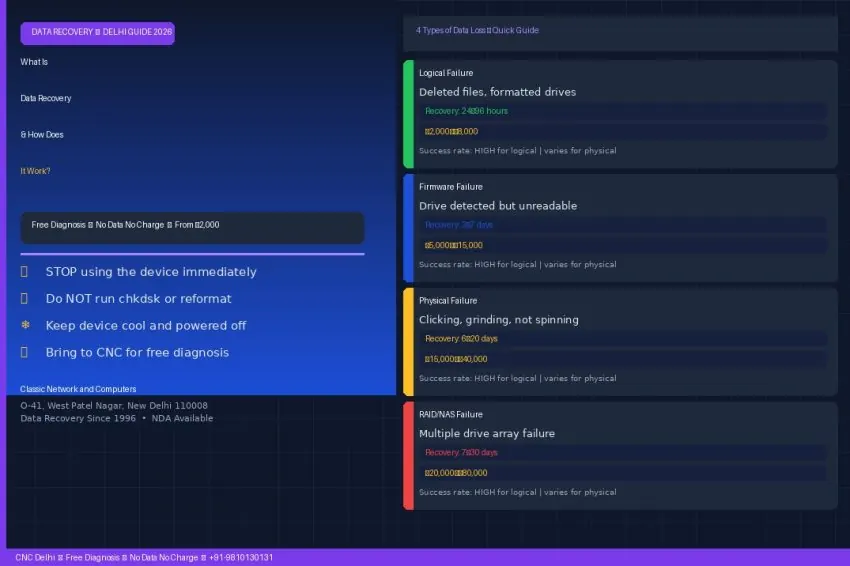
What Are the 4 Types of Data Loss?
Understanding the type of failure determines how data is recovered, how long it takes, and what it costs.
1. Logical Failure — Accidental Deletion or Corruption
The storage device is physically working but the data is inaccessible due to software-level issues. This is the most common and most recoverable type of data loss.
- Accidentally deleted files
- Formatted hard drive or memory card
- Corrupted file system (chkdsk errors, RAW partition)
- Virus or ransomware encryption
- Partition table errors
Recovery time: 24–96 hours | Cost at CNC Delhi: ₹2,000–₹8,000
2. Firmware Failure — Drive Detected but Unreadable
The drive is recognised by the computer but cannot be read. This occurs when the drive’s internal firmware becomes corrupted.
- Drive shown in Device Manager but not accessible
- Drive makes repetitive beeping sounds at startup
- Drive detected with wrong capacity (shows 0MB or 2MB)
- S.M.A.R.T. errors with sectors marked as bad
Recovery time: 3–7 working days | Cost at CNC Delhi: ₹5,000–₹15,000
3. Physical Failure — Mechanical or Electronic Damage
The storage device has suffered physical damage to moving mechanical parts or electronic components. This is the most serious type of failure.
- Clicking or grinding sounds — indicates read/write head failure (power off immediately)
- Drive not spinning at all
- Burnt smell or visible burn marks on PCB
- Drive dropped or exposed to water or fire
- SSD with no power response after power surge
⚠ If your hard drive is clicking or grinding, power it off immediately. Continued use causes permanent platter damage that can make data unrecoverable.
Recovery time: 6–20 working days | Cost at CNC Delhi: ₹15,000–₹40,000
4. RAID / NAS / Server Failure
RAID arrays distribute data across multiple drives. When drives fail simultaneously or a RAID controller fails, the entire array becomes inaccessible.
- RAID 0 — any single drive failure means complete data loss without recovery
- RAID 1/5/6/10 — multiple simultaneous drive failures or controller corruption
- NAS device (Synology, QNAP, Seagate NAS) — firmware corruption or multiple disk failure
- Server with failed RAID card and no backup
Recovery time: 7–30 working days | Cost at CNC Delhi: ₹20,000–₹80,000
How Does Data Recovery Work at CNC in Delhi?
Classic Network and Computers follows a structured 4-step process at its West Patel Nagar centre:
- Free diagnosis (same day) — Drop off your device at O-41, West Patel Nagar or courier it. CNC assesses the failure type and tells you the recovery probability the same working day. Free regardless of outcome.
- Transparent fixed-price quote — CNC provides a fixed price before any recovery work begins. No surprise charges. No Data No Charge — if CNC cannot recover your data, you pay nothing.
- Recovery — Logical recoveries complete in 24–96 hours. Firmware recovery takes 3–7 working days. Physical recovery takes 6–20 working days. Emergency fast-track available for urgent business data.
- Verification and delivery — You verify the recovered files before paying — in person at West Patel Nagar or via a secure online file listing. Data delivered on a new healthy drive or via encrypted transfer.
What Should You Do Immediately When Data Loss Occurs?
- 🛑 Stop using the device immediately — every write operation overwrites potentially recoverable data
- 📵 Do NOT run chkdsk, SFC, or format the drive — these operations destroy recovery chances
- ❄ Keep the device cool and powered off — heat accelerates damage
- 📞 Do not attempt DIY recovery software on a physically damaged drive — causes further damage
- ✅ Bring to CNC immediately for free diagnosis — the sooner you act, the higher the recovery rate
What Types of Storage Does CNC Recover Data From in Delhi?
| Device Type | Common Brands / Models |
|---|---|
| Hard Disk Drive (HDD) | Seagate, Western Digital, Toshiba, Hitachi, Samsung |
| Solid State Drive (SSD) | Samsung, Crucial, Kingston, WD, Sabrent, Seagate |
| NVMe / M.2 SSD | Samsung 970/980, WD Black, Kingston KC3000 |
| USB Flash Drive | SanDisk, Kingston, HP, Transcend, Sony |
| Memory Card | SD card, microSD, CF card — all brands |
| RAID Array | RAID 0, 1, 5, 6, 10 — all configurations |
| NAS Device | Synology, QNAP, Seagate NAS, WD My Cloud |
| CCTV DVR / NVR | Hikvision, CP Plus, Dahua, Samsung DVR footage |
How Much Does Data Recovery Cost in Delhi at CNC?
- Logical recovery (deleted files, formatted drive, corrupted partition): ₹2,000–₹8,000
- Firmware recovery (drive detected but unreadable): ₹5,000–₹15,000
- Physical recovery (clicking drive, not spinning, water damage): ₹15,000–₹40,000
- RAID / NAS recovery: ₹20,000–₹80,000 depending on array size and failure
- Diagnosis: Always free — regardless of outcome
No Data No Charge policy — you pay nothing if data cannot be recovered. No call-out fees, no diagnosis fees, no charges for failed recovery attempts.
Where Can I Get Data Recovery in Delhi?
Address: O-41, West Patel Nagar, New Delhi 110008
Hours: Monday to Saturday, 10 AM to 7 PM
Phone: +91-9810130131 | +91-9871291536
WhatsApp: 8130992267
Metro: Shadipur Station, Blue Line — 5-minute walk
Devices can also be couriered to CNC from anywhere in India. CNC will diagnose, provide a quote, and ship recovered data back securely.
Frequently Asked Questions — Data Recovery in Delhi
What is data recovery?
Data recovery is the process of retrieving lost, deleted, corrupted, or inaccessible data from storage devices including hard drives (HDD), SSDs, USB drives, memory cards, RAID arrays, NAS systems, and CCTV DVR recordings. Classic Network and Computers (CNC) in Delhi provides professional data recovery with a No Data No Charge policy.
How does data recovery work?
Data recovery at CNC Delhi follows 4 steps: (1) Free diagnosis — CNC assesses the failure type and recovery probability the same day. (2) Fixed-price quote — disclosed before any work begins. (3) Recovery — using professional tools, taking 24 hours to 30 days depending on failure severity. (4) Verification before payment — you confirm recovered files before paying.
How much does data recovery cost in Delhi?
Data recovery cost at CNC Delhi depends on failure type. Logical recovery (deleted files, formatted drives) costs ₹2,000–₹8,000. Firmware recovery costs ₹5,000–₹15,000. Physical recovery (clicking drives, mechanical damage) costs ₹15,000–₹40,000. RAID and NAS recovery costs ₹20,000–₹80,000. Diagnosis is always free. No Data No Charge — you pay nothing if recovery fails.
What should I do immediately when my hard drive fails?
Stop using the device immediately — every write operation overwrites recoverable data. Do not run chkdsk, SFC, or format the drive. If the drive is clicking or grinding, power it off immediately as continued use causes permanent damage. Bring the device to CNC at O-41, West Patel Nagar, New Delhi for a free diagnosis as soon as possible.
Can CNC recover data from a physically damaged hard drive in Delhi?
Yes. Classic Network and Computers provides physical data recovery for hard drives with head crashes, motor failures, PCB damage, and other mechanical faults. Physical recovery takes 6–20 working days and costs ₹15,000–₹40,000. CNC diagnoses the fault for free and provides a fixed price before any work begins.
Does CNC offer RAID and NAS data recovery in Delhi?
Yes. Classic Network and Computers recovers data from RAID 0, 1, 5, 6, and 10 arrays, NAS devices (Synology, QNAP, Seagate NAS), and enterprise server storage. RAID recovery takes 7–30 working days and costs ₹20,000–₹80,000 depending on array size and failure type.
CNC Delhi — Data Recovery
Lost your data? CNC provides free diagnosis — No Data No Charge
HDD, SSD, RAID, NAS, USB, memory card and CCTV DVR recovery from ₹2,000. Diagnosis always free. You only pay if we recover your data. Drop in at West Patel Nagar or call now.
Related Services at CNC
You May Also Like
📍 O-41 West Patel Nagar · Mon–Sat 10 AM–7 PM
Lost important files? We can help.
CNC recovers data from HDDs, SSDs, RAID, NAS and pen drives. Free diagnosis. No Data — No Charge.
⭐ 4.9★ · 1,000+ Google reviews · Since 1996 · GST invoice · Learn more →
When software isn't enough — professional data recovery in Delhi
Recovery software cannot help with physical damage, clicking drives, or failed SSD controllers. Classic Network and Computers (CNC) provides professional data recovery in New Delhi for HDD, SSD, RAID, NAS, and USB drives — from ₹2,000 with a No Data No Charge policy, free diagnosis, and free pickup within 10 km of West Patel Nagar. Most recoveries complete in 48–96 hours.
Prices and rates mentioned in this article are indicative estimates as of August 2026, exclusive of GST unless stated, and may change without notice due to exchange-rate movements, supply constraints and market demand. Please confirm current pricing and availability with CNC before making any decision.