
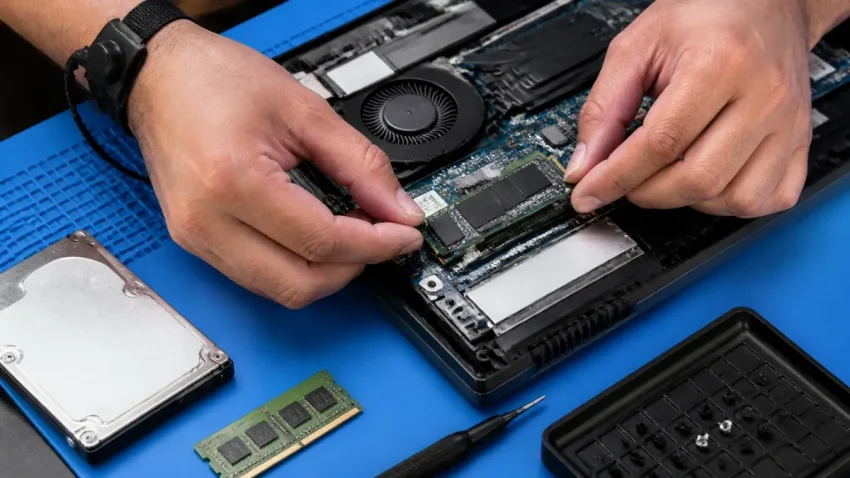
A laptop that takes several minutes to start, freezes when a few browser tabs are open, or struggles with Tally and Excel together is often not worn out. In most cases it is short of memory (RAM) or still running on an old hard disk. Upgrading one or both costs far less than a new laptop. This guide explains how to tell which upgrade will help, how to check what your laptop supports, what it costs in Delhi, and what a faulty RAM slot means.
Not sure what your laptop supports? WhatsApp the exact model (from the sticker under the laptop) to +91-8130992267. We tell you which upgrade fits and the parts price. Labour is ₹499.
Quick help from CNC — West Patel Nagar, Delhi
Need laptop repair in Delhi?
CNC fixes all brands — Dell, HP, Lenovo, MacBook. Same-day service from ₹299. Free pickup within 10 km.
⭐ 4.9★ · 1,000+ Google reviews · Since 1996 · GST invoice · Laptop repair in Delhi — services and prices →
RAM and SSD upgrade cost in Delhi
| Job | CNC price (October 2026 price list) |
|---|---|
| RAM upgrade | ₹499 labour + parts |
| SSD upgrade (hard disk to SSD, or a larger SSD) | ₹499 labour + parts |
| OS reinstall, if a fresh installation is better than copying the old drive | ₹600–₹1,200 |
| RAM slot or memory fault on the motherboard (chip-level repair) | ₹1,500–₹8,000+ |
Parts are priced on the day, by capacity and type, and shown to you before fitting. There are no fixed prices: the actual price is confirmed after a free diagnosis and depends on the issue and the make and model.
Which upgrade will help?
| What you notice | Usual cause | Upgrade that helps |
|---|---|---|
| Slow start, slow to open files, disk shows 100% in Task Manager | Old hard disk (HDD) | SSD |
| Fine with one app, freezes with many tabs or two heavy apps | Too little RAM | More RAM |
| Both of the above | 4 GB RAM and a hard disk | Both — SSD first |
| Shuts down or slows when it gets hot | Cooling | Neither — needs cleaning and fresh thermal paste |
For everyday office work, 8 GB of RAM and an SSD is a comfortable minimum today; 16 GB helps with heavy Excel files, design software or many browser tabs.
Check what your laptop supports
- Soldered RAM. Many thin laptops have some or all RAM soldered to the board. If there is no free slot, RAM cannot be added — only the SSD can be upgraded.
- Number of RAM slots. Some laptops have one slot, some two. The maximum RAM depends on the model, not just the slot count.
- SSD type. Older laptops take a 2.5-inch SATA SSD in place of the hard disk. Newer ones have an M.2 slot, which may take a SATA M.2 or a faster NVMe SSD. Some have both.
- MacBooks. Apple-silicon MacBooks (M1 to M5) have memory and storage built into the board, so they cannot be upgraded after purchase. Some older Intel MacBooks can.
The free diagnosis confirms all of this before any part is bought.
Moving your data to the new SSD
When the old drive is healthy, its contents — Windows, software and files — can be copied (cloned) to the new SSD, so the laptop works exactly as before, only faster. When the old drive is failing or Windows itself is the problem, a fresh installation on the SSD is better, with your files backed up and copied back. We explain which suits your laptop when we confirm the price.
RAM slot faults
If the laptop does not start, beeps, or shows less RAM than is fitted, the RAM stick may be faulty — or the slot on the motherboard may be. A faulty stick is replaced. A damaged slot or memory circuit needs chip-level motherboard repair (₹1,500–₹8,000+), which CNC does. See Laptop Motherboard Repair Cost in Delhi.
Desktops
Desktop RAM and SSD upgrades cost the same ₹499 labour + parts, and most desktops have free slots for both. See computer repair in Delhi for desktop services.
Where to get it done
Walk in to CNC at O-41, West Patel Nagar (3 minutes from Shadipur Metro, Gate 4), Monday to Saturday, 10 AM to 7 PM. Pickup and drop is free within 10 km of the store; an engineer’s doorstep visit costs ₹299, adjusted against the repair. The work carries a 90-day warranty. See all prices on the laptop repair in Delhi page.
Frequently asked questions
How much does a laptop RAM upgrade cost in Delhi?
At CNC, RAM or SSD upgrade labour is ₹499, plus the cost of the part. The part price depends on capacity and type and is shown before fitting.
Is an SSD or more RAM better for a slow laptop?
If the laptop still has a hard disk, an SSD usually makes the biggest difference. Add RAM when the laptop slows down only with many apps or tabs open.
Can RAM be added to every laptop?
No. Many thin laptops have RAM soldered to the board with no free slot. Apple-silicon MacBooks (M1 to M5) cannot be upgraded at all. The free diagnosis checks your model.
Will I lose my data when the SSD is fitted?
No. When the old drive is healthy, its contents are cloned to the new SSD. When a fresh installation is better, your files are backed up first and copied back.
How much does RAM slot repair cost?
A damaged RAM slot needs chip-level motherboard repair, which costs ₹1,500–₹8,000+ at CNC depending on the fault and the model.
📍 O-41 West Patel Nagar · Mon–Sat 10 AM–7 PM
Need laptop repair in Delhi?
CNC fixes all brands — Dell, HP, Lenovo, MacBook. Same-day service from ₹299. Free pickup within 10 km.
⭐ 4.9★ · 1,000+ Google reviews · Since 1996 · GST invoice · Laptop repair in Delhi — services and prices →
Prices and rates mentioned in this article are indicative estimates as of November 2026, exclusive of GST unless stated, and may change without notice due to exchange-rate movements, supply constraints and market demand. Please confirm current pricing and availability with CNC before making any decision.