
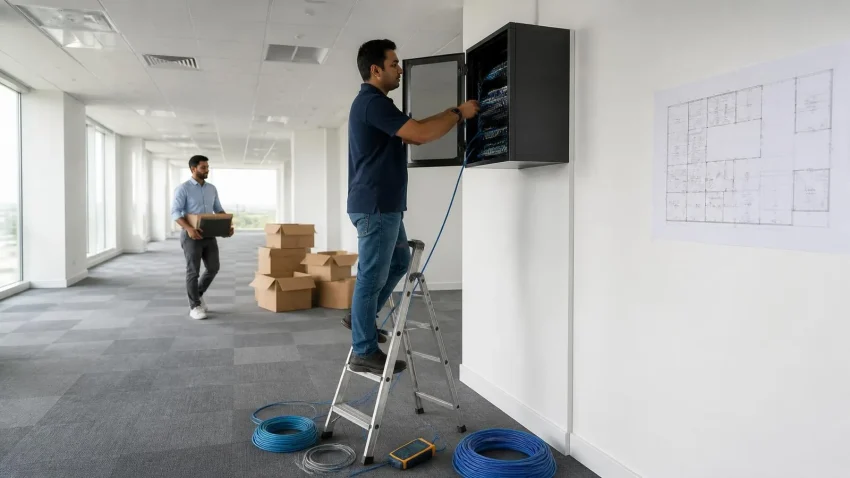
Ask any Delhi business owner about their last office move and the story is rarely about furniture. It’s about the Monday morning when the internet wasn’t live, the server wouldn’t boot after the van ride, the CCTV was still in a carton, and thirty people sat looking at each other. Office relocation is the single most common trigger for network and cabling projects in our 30 years — and the single most common cause of avoidable downtime. This checklist is the sequence CNC uses when we move a client. Follow the order and the timing, and the IT side of your move becomes boring — which is exactly what you want.
The one rule: IT goes in before the furniture, not after
Cabling needs bare walls and open ceilings. Internet needs weeks of ISP lead time. Power needs an electrician before the desks are placed. Every one of these gets harder and more expensive once the office is furnished. Start the IT plan the day you sign the lease.
Quick help from CNC — West Patel Nagar, Delhi
Need cyber security or IT support?
CNC provides VAPT, firewall setup, DPDP compliance and managed security for Delhi businesses.
⭐ 4.9★ · 1,000+ Google reviews · Since 1996 · GST invoice · Learn more →
6–8 weeks before the move: plan and order
- Get the floor plan and walk it with your IT partner. Mark every desk, printer, meeting room, server/network cabinet location, CCTV camera position, and Wi-Fi access point. Count network points — the rule is two per desk (one spare) plus points for printers, TVs, cameras and access points.
- Order internet now. Leased-line and business fibre installations in Delhi routinely take 2–4 weeks, longer if the building needs a new cable pull. Order a primary line and a cheaper secondary (broadband or 4G/5G failover) — a business without redundancy is one JCB away from a dead week.
- Decide the network cabinet location. It needs ventilation, a dedicated power circuit, no water pipes overhead, and lockable access. A store cupboard next to the pantry is the classic mistake.
- Size the power. Count machines, printers, network gear and the server; brief the electrician on dedicated circuits for the cabinet and UPS. This is also when to size the UPS — see our UPS and power conditioning guide.
- Audit what you’re moving. A move is the natural moment to retire PCs that fail Windows 11 requirements, replace the dying printer, and consolidate the three switches nobody remembers buying. Moving junk costs the same as moving good equipment.
3–5 weeks before: build the new office’s backbone
- Structured cabling. Cat6 or Cat6A to every point, terminated on a patch panel, tested and labelled at both ends. Indicative Delhi cost is ₹1,200–₹2,500 per point including cable, jack, faceplate, labour and testing, depending on run length and ceiling access. Insist on a test report — every point certified — before you pay.
- Network cabinet and switches. Rack, patch panel, managed switch sized with 20% spare ports, cable management. Set the switch up with the same VLAN scheme as the old office so devices come up without reconfiguration.
- Wi-Fi survey and access points. Ceiling-mounted enterprise access points on PoE, placed from a survey — not “one router in the corner”. Separate guest and staff networks.
- CCTV and access control conduits. Camera cabling runs in the same ceiling pass as network cabling; doing it later means opening the ceiling twice. Plan positions for entrance, reception, server cabinet, and cash-handling areas. See CCTV and access control.
- UPS and earthing. Install the UPS and verify proper earthing at the cabinet — bad earthing in older Delhi buildings kills switches and PCs slowly and invisibly.
1–2 weeks before: prepare the move itself
- Full backup of everything — server, NAS, key PCs — verified by a test restore. Not “we have a backup”; a restore you’ve actually watched succeed. Equipment gets dropped, and vans get stuck.
- Document the current network: IP scheme, router config export, printer IPs, Tally server details, shared drive mappings. Export and store two copies off-site.
- Label every device and cable with desk number from the new floor plan. Bag each desk’s peripherals together.
- Confirm internet activation date in writing from the ISP, and test the line at the new office before moving day.
- Notify vendors: ISP, Tally support, AMC provider, any cloud service with IP whitelisting, courier and payment-terminal providers.
- Schedule the move for Friday evening or a weekend with the IT team on-site Saturday and a Sunday buffer for problems.
Moving day: the sequence that works
- Server and network equipment travel separately from furniture — in the car, not the truck — packed in original or anti-static packaging with drives secured.
- Network cabinet goes live first: internet, switches, Wi-Fi, firewall. Test from a laptop before anything else arrives.
- Server next; verify it boots, backup job runs, and shared drives are reachable.
- Printers and shared devices, with new IPs recorded.
- Desks last, in order of business priority — accounts and customer-facing first.
- CCTV recording verified, access control tested with real cards.
The first week: stabilise
Keep the IT team on call for the first three working days. Run a desk-by-desk check on day one, confirm backups have run for three consecutive nights, and only then release the old office. Update your business address on Google Business Profile, invoices, Tally, email signatures and your website — and update the AMC contract to the new address and asset list.
What to budget: the IT line items of a Delhi office move
For a 30-seat office, the IT side of a relocation typically breaks into: structured cabling for 60–70 points; a network cabinet with patch panel, managed switch and cable management; two to three ceiling access points; a business firewall; an online UPS in the 5–6 kVA range with battery bank; CCTV with six to ten cameras and an NVR; electrical work for dedicated circuits and earthing; move-day engineering support; and a stabilisation retainer for the first week. Reusing sound existing equipment (switches under four years old, cameras that still record cleanly, a UPS with a fresh battery) can trim the total meaningfully — which is why the audit in week one matters. Ask for the quotation broken into exactly these lines so you can see what is new, what is reused, and what is labour.
The five mistakes we see most
| Mistake | Consequence | Prevention |
|---|---|---|
| Ordering internet after moving | 1–4 weeks on mobile hotspots | Order at lease signing |
| Cabling after furniture | Double labour, visible trunking, delays | Cabling in the bare-shell window |
| Server in the removal truck | Drive damage, data loss | Hand-carry, verified backup first |
| No cable testing/labelling | Weeks of “which port is this?” | Certified test report, labels both ends |
| Reusing 10-year-old switches | Bottlenecks, mystery drops | Audit and retire during the move |
Frequently asked questions
How long should IT setup take for a 30-person office in Delhi?
With the bare-shell window used properly: cabling 3–5 days, cabinet and Wi-Fi 1–2 days, move-day cutover in one weekend. The critical path is almost always ISP activation, which is why it’s ordered first.
Should we move the old server or replace it?
If it’s over five years old or out of warranty, replacing at the move is cheaper than moving it and replacing it a year later. Many offices use the move to shift file storage to a NAS with cloud backup instead.
Can our existing AMC provider handle the relocation?
Relocation is a project, not routine maintenance. Ask for a fixed-scope quote covering cabling, cabinet, move-day support and stabilisation. CNC handles both — see our network solutions and IT AMC.
Is Cat6A worth it over Cat6 for a small office?
For a standard office, Cat6 is sufficient and cheaper. Choose Cat6A if you expect 10-Gigabit links to a server or NAS, or if the lease is long and you’d rather never re-cable.
Moving office in Delhi? Get the IT side handled end to end
CNC plans, cables, installs and cuts over your new office — structured cabling with certified test reports, network cabinet, Wi-Fi, UPS, CCTV and move-day support. Serving Delhi since 1996, 4.9★ from 1,000+ Google reviews.
📍 O-41 West Patel Nagar · Mon–Sat 10 AM–7 PM
Need cyber security or IT support?
CNC provides VAPT, firewall setup, DPDP compliance and managed security for Delhi businesses.
⭐ 4.9★ · 1,000+ Google reviews · Since 1996 · GST invoice · Learn more →
Prices and rates mentioned in this article are indicative estimates as of October 2026, exclusive of GST unless stated, and may change without notice due to exchange-rate movements, supply constraints and market demand. Please confirm current pricing and availability with CNC before making any decision.