
Published by Classic Network and Computers (CNC) — IT services company at O-41, West Patel Nagar, New Delhi 110008, serving Delhi NCR since 1996. Computer repair, data recovery, networking, AMC, CCTV & more. ☎ +91-9810130131
Quick help from CNC — West Patel Nagar, Delhi
Need laptop repair or data recovery help?
CNC is at West Patel Nagar, Delhi — same-day service, free diagnosis, No Fix No Charge.
⭐ 4.9★ · 1,001 Google reviews · Since 1996 · GST invoice · Learn more →
What Happens Inside Your Laptop When Liquid Gets In
Water and electronics are enemies for one simple reason: liquid conducts electricity. The moment water in your laptop starts spreading, it creates unintended electrical pathways across the motherboard, short-circuiting components that are designed to carry precise, controlled voltages. The damage happens in two stages:
- Immediate short circuit — liquid bridges connections on the motherboard, causing sudden power surges that can burn chips and capacitors
- Corrosion over time — even after drying, mineral deposits from water, sugar from tea and coffee, and acids from cold drinks continue to corrode copper traces on the board for days and weeks
This is why a laptop that seems fine after a spill can fail completely 2–3 days later. And it is why acting fast — and correctly — in the first 60 seconds makes the difference between a ₹2,000 keyboard replacement and a ₹20,000 motherboard replacement.
What to Do Immediately — The 60-Second Rule
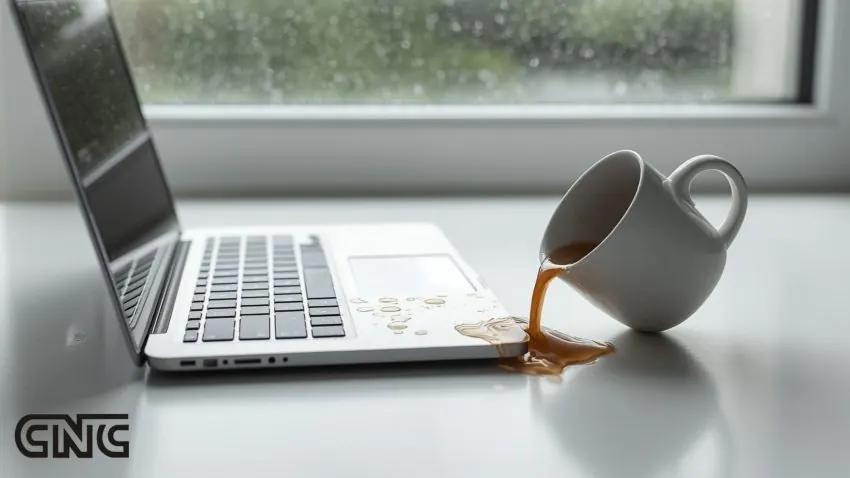
If coffee is spilled on your laptop, tea is spilled on your keyboard, or you have been caught in rain — follow these steps in order. Do not skip any.
Step 1 — Power off immediately (do NOT shut down normally)
Hold the power button for 5 seconds until the laptop cuts off completely. Do not click Start → Shut Down. Do not wait for Windows to save files. Cut power now. Every second the motherboard is powered with liquid on it increases the damage.
Step 2 — Unplug the charger
Pull the power adapter out of the wall and disconnect it from the laptop. Mains voltage through a wet laptop is a serious electrocution risk.
Step 3 — Remove the battery if accessible
On older laptops with removable batteries — remove it immediately. Most modern laptops have internal batteries, so skip this step.
Step 4 — Remove everything connected
Unplug mouse, USB drives, headphones, external monitors — everything. Remove the SD card if there is one.
Step 5 — Turn the laptop upside down immediately
Open the lid fully, turn the laptop upside down, and rest it on a dry towel in an inverted V shape. This drains liquid out through the keyboard rather than letting it flow deeper into the motherboard. Leave it this way.
Step 6 — Gently blot — do NOT wipe or shake
Use a dry cloth or paper towel to gently blot visible liquid from the keyboard and ports. Do not rub or wipe — this spreads liquid further. Do not shake the laptop — this splashes liquid into areas it has not yet reached.
Step 7 — Do NOT do these things
- ❌ Do not use a hair dryer or heat gun — heat damages the screen, warps the chassis, and drives moisture deeper into components
- ❌ Do not put it in rice — rice absorbs almost no moisture from electronics and wastes critical drying time. This is a myth.
- ❌ Do not press the power button to check if it works — powering on a wet laptop almost always causes irreversible short circuit damage
- ❌ Do not use a fan to blow into the keyboard — this pushes liquid further into the board
- ❌ Do not wait and see — corrosion starts within hours. The sooner it reaches a technician, the better
What to Do If Coffee Is Spilled on Your Laptop
Coffee and tea are significantly more damaging than pure water. Both contain sugar, tannins, and acids that accelerate corrosion and leave sticky residues on the motherboard that cause intermittent faults even after the liquid has dried. If you have coffee spilled on your laptop:
- Follow Steps 1–7 above immediately
- Do not leave it overnight hoping it will dry — the sugar residue will harden and continue corroding
- Bring it to CNC the same day if at all possible — ultrasonic cleaning of the motherboard removes coffee residue that air drying cannot
- Tell the technician it was coffee or tea, not water — the cleaning process is different and more intensive
At CNC, coffee and tea damage boards are cleaned using professional ultrasonic cleaners and isopropyl alcohol treatment — the same process used by professional electronics repair labs worldwide.
Care of Laptop During Monsoon Season in Delhi
Delhi’s monsoon (July to September) brings a different kind of liquid threat. Rain damage is more unpredictable than spills — you may not even notice water has entered your laptop until symptoms appear later.
How monsoon damages laptops
- Direct rain exposure — caught without a cover while getting in or out of a vehicle
- High humidity — sustained humidity above 80% causes condensation inside the laptop, especially when moving from an air-conditioned office to the outside heat
- Wet bags — your laptop bag gets soaked in rain, and water seeps in gradually through zips and seams
- Flooding — low-lying areas of Delhi flood regularly in heavy rain, and laptops in bags on floors or in cars suffer water ingress
Ways to prevent laptops from liquid damage during monsoon
- 🌧 Use a waterproof laptop bag — not just water-resistant. Look for bags rated IPX4 or higher
- 💧 Keep a silica gel packet inside the bag — absorbs ambient moisture during humid days
- 🚗 Never leave the laptop on the car floor — the lowest point in any vehicle, always the first to flood
- ❄ Allow acclimatisation time — when coming from AC to outdoor heat, keep the bag closed for 10 minutes to let the temperature equalise before opening
- 🧴 Use a keyboard cover — a silicone keyboard protector costs ₹300 and prevents spills reaching the board
- 📱 Consider a laptop skin or sleeve — adds one more barrier against moisture
- ☕ No drinks near the laptop — keep mugs and glasses at arm’s length, never directly beside the laptop
Symptoms of Water Damage in a Laptop — What to Look For
Sometimes liquid damage is not obvious immediately. Watch for these signs in the days after a liquid incident:
- Laptop turning off randomly or refusing to power on
- Keys not working or keys registering wrong characters
- Screen flickering, showing lines, or going black intermittently
- Strange smell — burning or musty — coming from the laptop
- Battery not charging or discharging faster than usual
- Wi-Fi or Bluetooth stopping working intermittently
- Corrosion visible on ports (green or white deposits around USB/charging ports)
- Laptop getting much hotter than usual
Any of these symptoms after a liquid incident means the damage is progressing. Bring it to CNC immediately — the sooner, the better.
Where to Get Water Damaged Laptops Repaired in Delhi
Classic Network and Computers (CNC) at O-41, West Patel Nagar, New Delhi is one of Delhi’s most experienced specialist centres for liquid damaged laptop repair. CNC has been repairing liquid damaged laptops — tea spills, coffee spills, rain damage, flood damage — since 1996. Every liquid damage case goes through the same professional process:
CNC Liquid Damage Repair Process
- Free diagnosis — CNC opens the laptop, identifies all affected components, and gives you a complete assessment the same day. No charge for diagnosis regardless of outcome.
- Ultrasonic and IPA cleaning — the motherboard is cleaned professionally to remove all mineral deposits, sugar residue from tea and coffee, and corrosion. This is what separates professional repair from just drying the laptop.
- Component-level assessment — every chip, capacitor, and connector is tested individually to identify what has been damaged and what is intact
- Transparent fixed-price quote — you receive a complete itemised quote before any repair work begins. No surprises.
- Repair — damaged components are replaced. Common liquid damage repairs include keyboard replacement, charging port repair, motherboard chip-level repair, and screen replacement.
- Full function test — every repaired laptop is tested for 2 hours before handover to confirm all faults are resolved
- 6-month warranty — all repairs carry a 6-month warranty on parts and labour
CNC is Specialist in Liquid Damage Laptops
Many repair shops in Delhi refuse liquid damage cases or give up after basic drying. CNC handles cases that others cannot — including motherboard-level repair, chip replacement, and corrosion treatment for laptops that have been wet for several days. All brands covered: Dell, HP, Lenovo, MacBook, Asus, Acer, MSI, Samsung, Toshiba, Sony VAIO.
How Much Does Water Damaged Laptop Repair Cost in Delhi?
| Damage Type | Typical Repair | Estimated Cost | Time |
|---|---|---|---|
| Minor spill — keyboard only | Keyboard replacement | ₹800–₹2,500 | Same day |
| Charging port damaged | Port repair/replacement | ₹600–₹2,000 | Same day |
| Motherboard cleaning + minor damage | Ultrasonic clean + component repair | ₹2,000–₹6,000 | 1–3 days |
| Screen damage from liquid | Screen replacement | ₹2,500–₹8,000 | Same day if in stock |
| Motherboard chip damage | Chip-level repair / BGA rework | ₹4,000–₹15,000 | 3–7 days |
| Severe flooding / total immersion | Full board assessment + repair | ₹6,000–₹20,000 | 5–10 days |
Diagnosis is always free at CNC — regardless of how severe the damage appears. You receive a complete quote before any work begins. If the repair is not feasible, CNC will tell you honestly — and help with data recovery from the damaged device.
Take it to laptop repair experts in Delhi immediately. Do not attempt to power on a water-damaged laptop before a technician inspects it. CNC provides free doorstep pickup across Delhi NCR and offers liquid damage cleaning from ₹999.
Frequently Asked Questions — Water Damaged Laptop Repair
What to do if coffee spill over laptop — can it be saved?
Yes. If you act within the first few minutes after a coffee spill over your laptop, the chances of saving it are high. Power off immediately, unplug the charger, invert the laptop on a dry towel, and bring it to CNC the same day. Coffee contains sugar and acids that accelerate corrosion — same-day professional cleaning gives the best recovery outcome.
Can a laptop survive water damage?
Yes — if powered off immediately and brought to a professional technician quickly. Laptops that are powered off within the first few seconds and cleaned properly within 24–48 hours have a high recovery rate. The key variables are speed, liquid type (water recovers better than tea or coffee), and how much liquid entered.
My laptop fell in water but is still working. Should I get it checked?
Yes, immediately. A laptop that appears to work after a water incident has almost certainly suffered some liquid ingress. Corrosion begins within hours. Many laptops fail 2–7 days after a spill because of progressive corrosion that was not treated. Bring it to CNC for a free check — catching it early is far cheaper than waiting.
I spilled coffee on my laptop last week. Can it still be repaired?
Possibly — it depends on how much dried corrosion has formed. CNC has successfully repaired laptops brought in 2–3 weeks after a coffee spill. The success rate decreases with time, but it is always worth a free diagnosis before giving up. Bring it to O-41, West Patel Nagar.
How long does water damaged laptop repair take at CNC?
Minor liquid damage with keyboard or port replacement is completed the same day. Motherboard cleaning and component repair takes 1–3 days. Chip-level board repair takes 3–7 days. CNC gives you an accurate timeline after the free diagnosis.
Will my data be safe during liquid damage repair?
CNC treats your data with complete confidentiality. Repairs are carried out at component level — your storage device (SSD or HDD) is not touched during motherboard repair. If the storage device is also damaged, CNC provides professional data recovery as a separate service with a No Data No Charge policy.
Does CNC offer doorstep pickup for water damaged laptops in Delhi?
Yes. CNC provides free doorstep pickup of water damaged laptops across Delhi NCR. Call +91-9810130131 or WhatsApp 8130992267 to book. A CNC engineer collects your laptop, assesses it at West Patel Nagar, and returns it repaired.
🚨 Laptop damaged by water, tea, coffee or monsoon rain?
CNC at O-41, West Patel Nagar has been repairing liquid damaged laptops in Delhi since 1996. Free diagnosis. No Fix No Charge. 6-month warranty. Free doorstep pickup across Delhi NCR. All brands covered. 📍 O-41, West Patel Nagar, New Delhi 110008 | 🚇 3 min from Shadipur Metro (Blue Line) | ⏰ Mon–Sat 10 AM–7 PM📍 O-41 West Patel Nagar · Mon–Sat 10 AM–7 PM
Need laptop repair or data recovery help?
CNC is at West Patel Nagar, Delhi — same-day service, free diagnosis, No Fix No Charge.
⭐ 4.9★ · 1,001 Google reviews · Since 1996 · GST invoice · Learn more →
Need computer or laptop repair in Delhi?
Classic Network and Computers (CNC) repairs laptops and desktops of all brands at West Patel Nagar, New Delhi — same-day service from ₹299 with a 90-day same-issue warranty and a No Fix No Charge policy. Free pickup and drop within 10 km. Walk-in Mon–Sat, 10 AM–7 PM, 3 minutes from Shadipur Metro.
Prices and rates mentioned in this article are indicative estimates as of September 2026, exclusive of GST unless stated, and may change without notice due to exchange-rate movements, supply constraints and market demand. Please confirm current pricing and availability with CNC before making any decision.
1 thought on “Water Damaged Laptop? What to Do Immediately | CNC”