
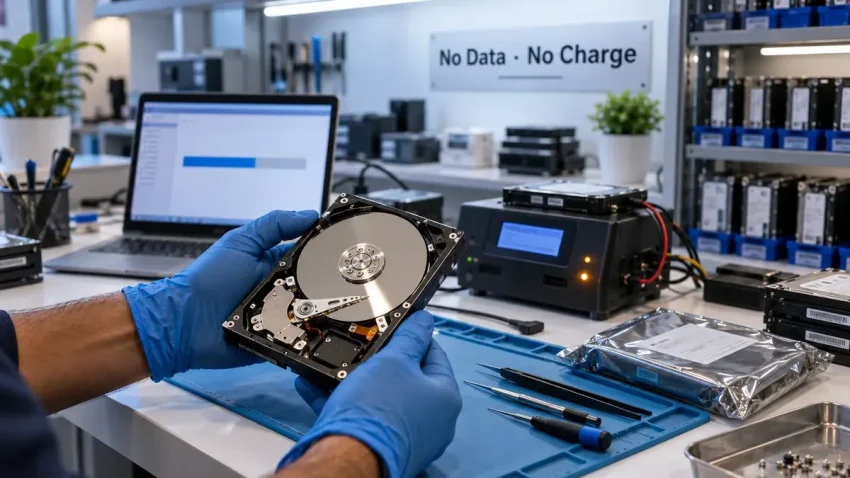
Most people bring in a dead hard drive with the same three questions: can the data be recovered, how long will it take, and how much will it cost? These are the right questions. But understanding the process behind those answers — what actually happens when CNC receives a failed drive — helps you make better decisions and sets realistic expectations from the start.
CNC has been recovering data from failed storage devices in Delhi since the 1990s. Hard drives then were physically larger, mechanically simpler, and stored a fraction of what they do today. The principles of physical data recovery have not changed. What has changed is the complexity of storage technology — SSDs, RAID arrays, NAS devices, encrypted drives — which means the diagnostic process is now more nuanced than it ever was.
Quick help from CNC — West Patel Nagar, Delhi
Lost important files? We can help.
CNC recovers data from HDDs, SSDs, RAID, NAS and pen drives. Free diagnosis. No Data — No Charge.
⭐ 4.9★ · 1,000+ Google reviews · Since 1996 · GST invoice · Learn more →
This is an honest, technical description of what happens from the moment a failed drive lands on our workbench to the moment your data is returned to you.
Data recovery in Delhi — CNC, West Patel Nagar
Deleted files, dead hard drive, failed RAID, water-damaged laptop — CNC handles all storage recovery cases.
No recovery, no fee. Free assessment before you commit. Same-day diagnosis for most cases.
📞 Call CNC — 9810130131
💬 WhatsApp for Free Data Recovery Assessment →
⭐ 4.9★ · 996 Google reviews · Since 1996 · GST invoice
Step 1 — Intake and Initial Diagnosis (Free, No Commitment)
Every data recovery case at CNC begins with a free intake assessment. When you bring in or courier a failed drive, the first thing we do is assess the failure category — because the category determines the entire recovery approach.
We ask you what happened before the failure: did the drive make a clicking or beeping sound, did the laptop drop, was there a sudden power cut, did the drive simply stop being detected one day, or did you accidentally delete files or format the drive? This context is not just conversation — it narrows the diagnosis significantly before we even connect the drive to anything.
Then we visually inspect the drive. PCB damage (burnt components on the circuit board), physical deformation from a drop, moisture or corrosion marks — all of these are visible before any diagnostic software is involved. A drive showing physical damage to the PCB or casing goes straight to the hardware work path, not to a computer.
Step 2 — Failure Classification
Data recovery at a professional level starts with classifying the failure into one of four categories. The category determines whether the work is logical (software-level), firmware-level, or physical (hardware-level, where the drive must be opened).
Category 1 — Logical Failure
The drive is physically healthy — it spins up, is detected by the computer — but the data is inaccessible. This happens when files are accidentally deleted, a partition is reformatted, the file system is corrupted (common after an improper shutdown or power cut during write operations), or the Master Boot Record (MBR) or GUID Partition Table (GPT) is damaged.
Logical failures are handled entirely in software using professional data recovery tools — R-Studio, GetDataBack, or in complex cases, PC-3000 logical recovery modules. The drive is cloned first (see Step 3), and recovery work is done on the clone, not the original. Recovery rates for logical failures with a healthy underlying drive are typically very high — 90% or more of data is recoverable in straightforward cases.
Category 2 — Firmware Failure
Hard drives (HDDs) contain a small firmware zone on the drive platters themselves — separate from the user data area — that controls how the drive’s own electronics operate. Firmware corruption can cause a drive to not initialise properly, not be recognised by the OS, or be recognised but show zero capacity. This looks like a dead drive from the outside but is a software problem at the firmware level.
Firmware recovery requires specialist hardware tools — at CNC, a PC-3000 UDMA system — that can communicate with the drive’s service area independently of the drive’s normal operating mode. This is beyond the capability of consumer recovery software. Once the firmware is repaired, the drive becomes accessible and logical recovery proceeds.
Category 3 — PCB (Circuit Board) Failure
The Printed Circuit Board on the underside of a hard drive controls the drive’s electronics — the motor controller, read/write head amplifier, and the interface to the computer. A failed PCB — often from a power surge, a short circuit, or a failed component — means the drive will not spin up or be detected at all.
PCB replacement sounds simple — find the same board, swap it, done. In reality, modern hard drives store unique calibration data (the drive’s “adaptive” parameters) in a chip on the PCB or in the firmware zone. Simply swapping a PCB from a matching model drive will not work unless the calibration chip is also transferred. This requires soldering work and PCB-level electronics expertise, not just part replacement.
Category 4 — Physical / Mechanical Failure
This is the most serious failure category. Mechanical failures occur when the internal components of the drive are physically damaged — the read/write heads have crashed onto the platter surface, a platter has been scored or scratched, the head stack assembly (HSA) has seized, or the spindle motor has failed.
These repairs require opening the drive in a clean environment. Hard drive platters are precision-manufactured to tolerances measured in nanometres. A single dust particle landing on a spinning platter can score the surface and destroy data in that sector. Professional data recovery for physical failures must be done with appropriate particle controls — at CNC we maintain a dedicated clean workspace for physical drive work, distinct from our general repair areas.
Physical recovery involves replacing the damaged head stack with a compatible donor assembly, and then using professional imaging tools to read the platter data sector by sector, skipping unstable sectors and retrying them later. On a mechanically damaged drive, this imaging process can take 8–24 hours or longer for large drives.
Step 3 — Drive Cloning Before Recovery Work
Before any recovery work begins — whether logical, firmware, or physical — CNC creates a sector-by-sector clone of the original drive. This clone becomes the working copy for all recovery attempts. The original drive is set aside.
This step matters for two reasons. First, recovery tools sometimes re-read sectors multiple times during scanning — on a failing drive, repeated reads accelerate the deterioration of already-marginal sectors. Working on a clone means the original’s condition does not worsen during recovery attempts. Second, if a recovery approach fails or partially succeeds, the original is still intact as a fallback.
Drive cloning is done using hardware duplicators that work independently of the operating system — they communicate with the drive at the firmware level and do not rely on the drive being “healthy enough” to mount in Windows. For drives with bad sectors, the duplicator is configured to make multiple passes — recovering easy sectors first, then retrying difficult sectors — to extract as much data as possible before the drive degrades further.
Step 4 — SSD and NAS Recovery — Why It Is Different
The steps above describe traditional hard drive recovery. Solid-state drives (SSDs), RAID arrays, and NAS devices present different challenges.
SSD Recovery
SSDs use NAND flash memory chips rather than magnetic platters. There are no moving parts, so the clicking and grinding sounds of a dying HDD do not occur. An SSD failure is usually silent — one day it works, the next day the computer does not see it. Common SSD failure modes include controller failure (the chip that manages the flash memory), NAND wear-out (each cell can only be written a finite number of times), sudden power loss corruption, and firmware bugs.
SSD recovery does not involve opening a drive mechanism — there are no platters to expose. It involves chip-off recovery (de-soldering the NAND chips and reading them individually with dedicated chip readers), controller repair, or firmware recovery depending on the failure. Encrypted SSDs — including all modern MacBooks with Apple Silicon — present an additional layer because the encryption keys are tied to the controller hardware. If the controller fails on an encrypted SSD, the data on the chips is mathematically unreadable even if the chips themselves are intact.
RAID and NAS Recovery
A RAID array — whether it is RAID 0, RAID 1, RAID 5, or RAID 6 — distributes data across multiple drives. When one drive fails in a RAID array, the recovery approach depends on the RAID level. RAID 1 (mirroring) allows recovery from the surviving drive alone. RAID 5 can survive one drive failure mathematically but the rebuild process is itself a significant risk — a second drive failure during rebuild (common given that all drives in the array are the same age and load profile) results in complete data loss.
CNC’s approach to RAID recovery is to image all member drives individually first, then reconstruct the RAID virtually in software — determining the stripe size, block order, and disk order — before extracting the recovered file system. This avoids the risk of a controller-level rebuild on failing hardware.
Step 5 — Data Verification and Delivery
Recovered data is verified before delivery. CNC provides a file listing of what was successfully recovered, which allows you to confirm whether the critical files are present before accepting the recovery. For business clients, we walk through the file list together if needed.
Recovered data is delivered on a new external hard drive (cost of drive charged separately) or, for smaller data volumes, via a USB drive or secure file transfer. The original drive and clone are retained for 15 days after delivery — after which they are securely wiped and the media recycled.
What Affects Recovery Success Rate
Three factors most directly determine whether data can be recovered and how much:
- How quickly the drive was powered off after failure. The worst thing you can do with a clicking hard drive is keep trying to start it. Each additional spin-up with damaged heads causes more platter damage and reduces the readable surface area. Power off immediately and bring it in.
- Whether DIY recovery was attempted first. Consumer software tools — Recuva, Disk Drill, EaseUS — are fine for accidental deletion on a healthy drive. On a physically failing drive, running these tools causes the drive to read and re-read sectors, accelerating deterioration. If the drive is making sounds or not being detected, do not run any software on it.
- The nature and extent of the physical damage. A single read/write head failure with no platter scoring is very different from a full head crash that has scored multiple platter surfaces. The latter limits which sectors are physically readable regardless of what tools are used.
CNC’s Pricing and No Recovery, No Fee Policy
CNC operates on a no-recovery, no-fee basis for data recovery — if we cannot recover your data, you do not pay the recovery fee. You pay only for the assessment (free) and any consumables used (clone drive, etc.). This policy applies to all failure categories.
For a full breakdown of what different recovery cases typically cost in Delhi, see our data recovery cost guide. For help deciding whether you need repair or recovery, see hard drive repair vs data recovery.
To choose between professional services for your case, see our guide on how to choose a data recovery service in Delhi.
Frequently Asked Questions
How do I know if my data can be recovered before bringing the drive in?
You usually cannot know with certainty until a professional assessment is done — but the symptoms give a strong indication. Deleted files or accidental formatting on a drive that still works: very high recovery probability. A drive that is not detected but does not make sounds: good probability (likely logical or firmware failure). A drive making clicking, beeping or grinding sounds: possible, but physical failure — probability depends on the extent of internal damage. A drive that has been dropped: depends on whether it was spinning at the time and the severity of impact. CNC’s assessment is free and gives you a definitive answer before you commit to any recovery work.
How long does professional data recovery take in Delhi?
Logical recovery (deleted files, formatted drive): 48–96 hours in most cases. Firmware failure recovery: 96–144 hours. PCB failure: 2–3 working days depending on donor parts availability. Physical/mechanical failure: 6–14 working days. RAID recovery: 10–20 working days and NAS recovery: 8–16 working days, depending on array size, number of drives, and extent of damage. CNC provides a specific timeline estimate after the initial assessment.
Is a clicking hard drive definitely unrecoverable?
No. A clicking drive indicates a read/write head failure or a platter issue — both require physical recovery work under clean conditions. The clicking sound itself does not determine whether data is recoverable — the state of the platters does. Drives brought in quickly (not run repeatedly after clicking started) with clean platter surfaces have high recovery rates even with complete head assembly failure. The critical action is to stop powering the drive on and get it to a professional immediately.
Can CNC recover data from a laptop hard drive that got wet?
Yes, in many cases. Water damage to a hard drive does not immediately destroy the data — the magnetic data on the platters is not affected by moisture. The damage comes from corrosion to the PCB and internal components if the drive is powered on while wet, or left to dry with residual moisture inside. The correct procedure is to not power on a water-damaged drive, not attempt to dry it with a hair dryer or in sunlight, and bring it to CNC in a sealed bag as soon as possible. Corrosion accelerates with time — the sooner we receive it, the better.
What is the difference between data recovery and a laptop repair?
Laptop repair fixes the hardware or software of the computer itself — a broken screen, a dead battery, a corrupted operating system. Data recovery focuses on retrieving data from a storage device that has failed, regardless of whether the laptop itself is repairable. Sometimes both are needed: a laptop’s screen may be broken but the drive is fine (data is safe, laptop needs repair); or the laptop boots fine but the drive has failed (data recovery needed, laptop hardware is fine). CNC handles both — see the laptop repair service and the data recovery service pages separately.
Does CNC handle RAID data recovery for businesses?
Yes. CNC handles RAID 0, 1, 5, 6, and 10 arrays from all common NAS brands (Synology, QNAP, Seagate NAS) and server RAID controllers. Each member drive is imaged individually before any reconstruction attempt. Virtual RAID reconstruction is used to determine the array parameters without risking further data loss on the original hardware. For multi-drive arrays, contact CNC with details of the NAS model and the failure scenario for a tailored assessment.
Is my data kept confidential during the recovery process?
Yes. CNC does not access your data beyond what is technically necessary to verify recovery success (confirming that recovered files are intact and readable). Client data is not copied, stored, or shared beyond the recovery process. The recovered drive and the working clone are securely wiped 15 days after delivery to the client. For businesses with strict data confidentiality requirements, CNC can provide a written data handling undertaking upon request.
Professional data recovery in Delhi — CNC, West Patel Nagar
Failed hard drive, deleted files, dead SSD, RAID failure — CNC recovers data from all storage devices. Free assessment. No recovery, no fee. Same-day diagnosis for most cases.
📞 +91-9810130131 ·
💬 WhatsApp us ·
Full data recovery service →
📍 O-41 West Patel Nagar · Mon–Sat 10 AM–7 PM
Lost important files? We can help.
CNC recovers data from HDDs, SSDs, RAID, NAS and pen drives. Free diagnosis. No Data — No Charge.
⭐ 4.9★ · 1,000+ Google reviews · Since 1996 · GST invoice · Learn more →
Prices and rates mentioned in this article are indicative estimates as of October 2026, exclusive of GST unless stated, and may change without notice due to exchange-rate movements, supply constraints and market demand. Please confirm current pricing and availability with CNC before making any decision.