A NAS — the network storage box from Synology, QNAP, WD, NETGEAR, Buffalo or Seagate that holds an office’s shared folders and backups — usually fails without much warning. One morning the shares are missing, the web page says “volume crashed” or “degraded”, or the box will not start after a firmware update. What you do in the next hour decides how much of the data comes back. This guide explains the common NAS failures, the steps to take and avoid, how CNC recovers NAS data at its lab in West Patel Nagar, and what it costs.
NAS down or volume crashed? WhatsApp the NAS model, number of drives and the message on screen to +91-8130992267. Do not start a rebuild or a reset first. Evaluation is free, and there is no fee if no data is recovered.
Quick help from CNC — West Patel Nagar, Delhi
Lost important files? We can help.
CNC recovers data from HDDs, SSDs, RAID, NAS and pen drives. Free diagnosis. No Data — No Charge.
⭐ 4.9★ · 1,000+ Google reviews · Since 1996 · GST invoice · Data recovery lab in Delhi — prices and process →
First: what not to do
- Do not click “Repair” or “Rebuild” on a degraded or crashed volume until the data is safe. A rebuild onto a weak drive is a common way for a recoverable NAS to become unrecoverable.
- Do not initialise, reset or reinstall the NAS operating system, and do not create a new volume or storage pool.
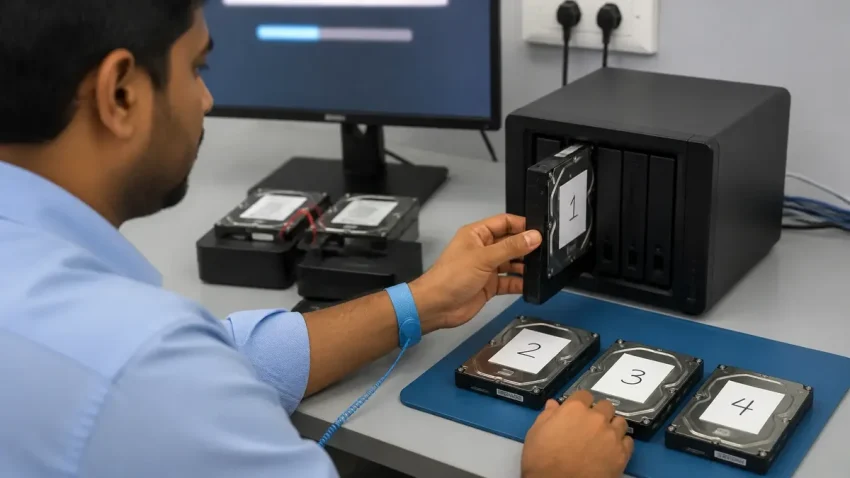
- Do not swap drive positions. Label each drive with its bay number before anything is removed — the order matters for reconstruction.
- Do not run recovery software on the drives inside the NAS or connect them one by one to a Windows PC that offers to “format” them.
- Switch the NAS off if a drive is clicking, beeping or getting hot.
Common NAS failures
| What you see | Usual cause |
|---|---|
| “Volume crashed”, “storage pool degraded” or “RAID failed” | One or more drives failed, or a rebuild stopped part-way |
| Shared folders missing or empty | Accidental deletion, a sync job, or ransomware |
| NAS will not start after a firmware or OS update | Failed update, corrupted system partition |
| NAS not visible on the network, lights blinking | Power supply, mainboard or system drive fault |
| Files renamed with strange extensions, ransom note | Ransomware encrypted the shares |
| Single-drive NAS (1-bay) not mounting | Drive failure or file system corruption |
Why NAS recovery is different from a single drive
Most office NAS boxes combine several drives into one volume using RAID (RAID 1, 5, 6 or 10, or the vendor’s own versions such as Synology SHR), usually on Linux software RAID with a volume manager and a file system such as Btrfs or ext4 on top. The data is spread across the drives, so each drive alone shows nothing useful. Recovery means copying every drive, working out the array layout, and rebuilding the volume from the copies — never on the original drives.
How CNC recovers NAS data
- Free evaluation — starts the same working day at our lab. Bring the whole NAS with its drives in place, or the drives labelled by bay.
- Written quote — by WhatsApp or email within 1–2 working days, with the price and the expected turnaround.
- Sector-by-sector images of every drive. All work is done on these images, never on the originals. A drive with a physical fault (heads or motor) goes to our specialist partner lab for imaging first, and the quote tells you this before any work starts.
- Array and volume reconstruction from the images, then the file system is read and the folders are rebuilt.
- You confirm the file list before paying. If no data is recovered, there is no fee.
- Delivery on your drive or a new drive bought from CNC.
Payment is only after you confirm the recovered file list — never in advance. For business clients an NDA is available on request. The full terms are on the data recovery terms page. CNC does not do on-site data recovery; NAS recovery is done in the lab.
NAS data recovery cost in Delhi
| Service | CNC price | Turnaround |
|---|---|---|
| NAS data recovery (Synology, QNAP, WD My Cloud, NETGEAR, Buffalo, Seagate) | ₹6,000–₹1,50,000 | 8–30 working days |
| Evaluation | Free | Starts the same working day |
The range is wide because NAS jobs vary a great deal. The price depends on the number of drives, their capacity, the RAID type, and whether the fault is logical (deleted shares, corrupted volume, failed update) or physical (failed drives). A one-bay NAS with a logical fault sits at the lower end; a large multi-bay NAS with several failed drives sits at the upper end. Your exact price is in the written quote, before any work starts. Emergency 24-hour service for business-critical data is available at an extra charge, quoted in advance.
Ransomware on a NAS
If the shares were encrypted, check first whether the NAS had snapshots turned on — Synology and QNAP snapshots can often restore folders as they were before the attack. Do not delete the encrypted files or reset the NAS. Disconnect it from the network and contact us; ransomware recovery is quoted after the free evaluation.
After recovery: stop it happening again
RAID protects against one drive failing, not against deletion, ransomware or a failed rebuild. Keep a separate backup of the NAS on another device or off-site (the 3-2-1 rule: 3 copies, 2 kinds of storage, 1 kept away), turn on snapshots, and replace drives that show warnings instead of waiting for a second failure. For larger arrays and servers, read RAID Data Recovery in Delhi.
Where to bring the NAS
CNC’s data recovery lab is at O-41, West Patel Nagar, New Delhi — 3 minutes from Shadipur Metro, Gate 4 — Monday to Saturday, 10 AM to 7 PM. CNC has no outlet in Nehru Place. NAS units and drives can also be sent by courier. See the data recovery lab in Delhi page for all services and prices.
Frequently asked questions
How much does NAS data recovery cost in Delhi?
At CNC, NAS data recovery costs ₹6,000–₹1,50,000, depending on the number of drives, capacity, RAID type and the fault. Evaluation is free, and there is no fee if no data is recovered.
How long does NAS data recovery take?
Usually 8–30 working days, depending on the size of the array and the damage. Emergency 24-hour service is available at an extra charge, quoted in advance.
Should I rebuild a crashed NAS volume myself?
No. A rebuild onto a weak drive can overwrite the data that recovery needs. Switch the NAS off, label the drives by bay, and get an evaluation first.
Which NAS brands does CNC recover?
Synology, QNAP, WD My Cloud, NETGEAR ReadyNAS, Buffalo and Seagate NAS, including single-bay units and multi-bay RAID volumes.
Do I pay before the data is recovered?
No. You pay only after you confirm the list of recovered files. If no data is recovered, there is no fee.
📍 O-41 West Patel Nagar · Mon–Sat 10 AM–7 PM
Lost important files? We can help.
CNC recovers data from HDDs, SSDs, RAID, NAS and pen drives. Free diagnosis. No Data — No Charge.
⭐ 4.9★ · 1,000+ Google reviews · Since 1996 · GST invoice · Data recovery lab in Delhi — prices and process →
Prices and rates mentioned in this article are indicative estimates as of November 2026, exclusive of GST unless stated, and may change without notice due to exchange-rate movements, supply constraints and market demand. Please confirm current pricing and availability with CNC before making any decision.